A meeting minutes template you can copy
The hardest part of keeping a record of a meeting is starting. A blank page invites you to write everything, which is exactly the wrong instinct. A meeting minutes template fixes that by deciding the shape in advance, so all you have to do is fill in the few things that matter. This post gives you one you can copy, plus a handful of variations for the meetings you actually have.
Use them however you like: paste one into your notes app before a call, keep a copy as a document you duplicate each time, or just use them as a checklist for what to capture. They are deliberately plain text, so they work anywhere.
What a good meeting minutes template includes
A template is only useful if it leaves out as much as it includes. The job of minutes is to answer three questions later: what did we decide, who is doing what next, and why. So a good meeting minutes template has a slot for each of those and not much else. A heading with the date and who was there, a short summary, the decisions, the action items with owners and deadlines, and a small space for anything else worth keeping.
If a section of a template is tempting you to transcribe the discussion, delete it. You are recording outcomes, not dialogue. The guide to writing meeting minutes goes deeper on what to keep and what to cut; the templates below are that advice turned into something you can paste.
A general meeting minutes template
Start here. This one suits most meetings, and the variations further down are just this template with the emphasis moved around.
# [Meeting name], [date]

Attendees: [names]
Apologies: [names]

## Summary
[Two or three sentences: what the meeting was about and where it landed.]

## Decisions
- [Decision], because [one line of context].
- [Decision], because [one line of context].

## Action items
- [Owner] to [action] by [date].
- [Owner] to [action] by [date].

## Notes
- [Anything worth keeping that isn't a decision or an action.]

## Next meeting
[Date, or "to be confirmed".]
The action items are the part people come back to, so give them the most care. Every one needs an owner and a deadline; an action without an owner is a wish, and an owner without a date is an open loop.
Templates for specific meetings
The general template works everywhere, but a few meeting types are common enough to be worth their own shape.
For a formal or board meeting, where the record may be referred back to as the official account, lean towards completeness and attribution.
# [Organisation] board meeting
Date: [date]   Time: [start] to [end]   Location: [place or call link]

Present: [names]
Apologies: [names]
Chair: [name]   Minute-taker: [name]

## Agenda items
1. [Item]
   Discussion: [the short version, not a transcript]
   Decision: [what was agreed]
   Action: [owner] to [action] by [date]

## Any other business
[Items raised that weren't on the agenda.]

## Date of next meeting
[Date]
For a team standup, where speed is the whole point, keep it to updates and blockers.
# [Team] standup, [date]

Present: [names]

## Updates
- [Name]: yesterday [...]; today [...]; blockers [...].

## Blockers to resolve
- [Blocker], owner [name].
For a one-to-one, where the value is continuity from one conversation to the next, give yourself room for the soft stuff as well as the actions.
# 1:1 with [name], [date]

## Since last time
- [Wins, progress, anything worth marking.]

## Challenges and support needed
- [What's hard, and what would help.]

## Decisions and actions
- [Owner] to [action] by [date].

## For next time
- [Things to pick up in the next 1:1.]
For a project kickoff, where everyone needs to leave with the same picture, capture scope and dates up front.
# [Project] kickoff, [date]

Attendees: [names]
Project goal: [one sentence]

## Scope
- In scope: [...]
- Out of scope: [...]

## Key dates
- [Milestone]: [date]

## Action items
- [Owner] to [action] by [date].

## Risks and open questions
- [What could go wrong, and what we don't yet know.]
Filling it in without missing the meeting
A template removes the blank-page problem, but it doesn't solve the real one: filling it in means looking down at your notes, and every moment you spend writing is a moment you are not listening. By the end you have a half-filled template and a patchy memory of the bits you missed while typing the earlier bits.
You can close most of that gap by filling the template after the meeting rather than during it, from memory and a quick scan of any chat messages, while it is all still fresh. That works, but it leans on your memory of a conversation you were only half-attending because you were taking notes. The better fix is to not take notes by hand at all.
Letting talat fill the template for you
This is what talat is built to do. It records the meeting on your own machine, with no bot joining the call and nothing uploaded, transcribes it as you go, and attributes each line to the person who said it. When the meeting ends, a model running on your computer reads the whole transcript and produces the same things this template asks for: a summary, the decisions, and a list of action items with their owners, plus chapters so you can jump straight to the part you need.
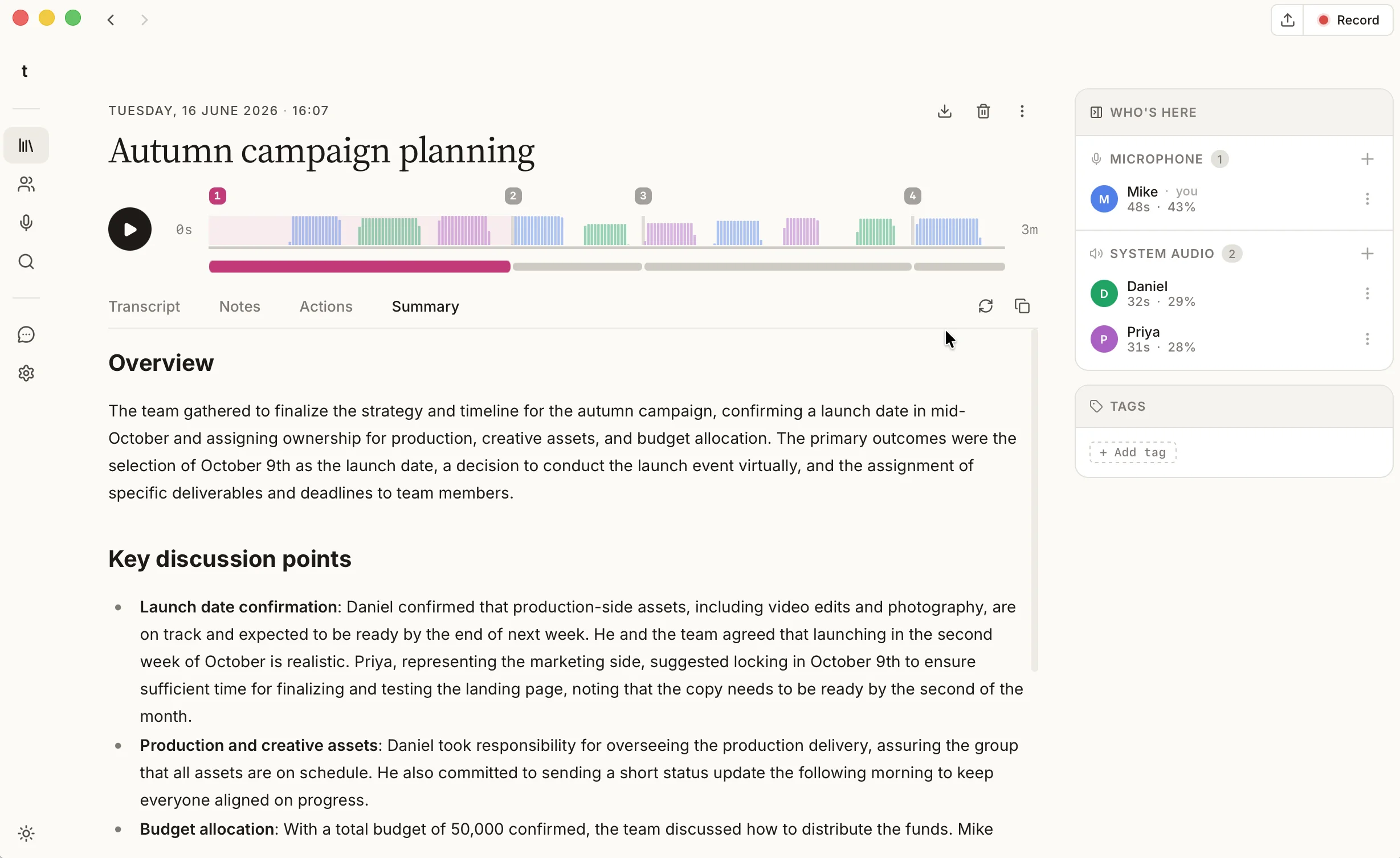
In other words, you get a filled-in template without having filled it in, and without having looked away from the conversation. The privacy part is the point rather than a footnote: the recording, the transcript, and the summary all live in a local database on your computer, and the model that writes them ships inside the app, so your meeting never leaves your machine. If you would rather a cloud model wrote sharper summaries you can connect one with your own key, but that is off by default and entirely your choice. It is a different deal from the cloud note-takers that send every call to someone else's servers; if you are comparing them, we keep an honest comparison with the tools people usually weigh up.
The short version
A meeting minutes template saves you from the blank page and keeps you honest about what to capture: a short summary, the decisions, and the action items with owners and deadlines. Copy the general one above, reach for a variation when a meeting calls for it, and send the result when you are done. Or let talat record the meeting and fill the template for you on your own machine, so you can pay attention to the conversation and still walk away with a clean record. You can try it free for ten hours, with no account.