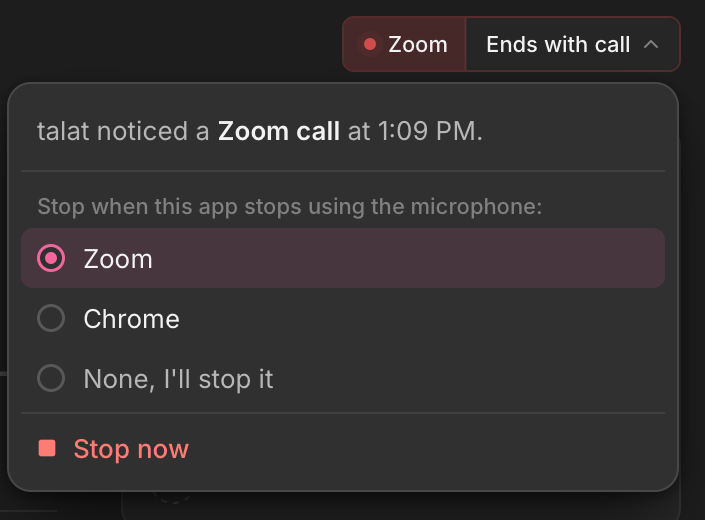
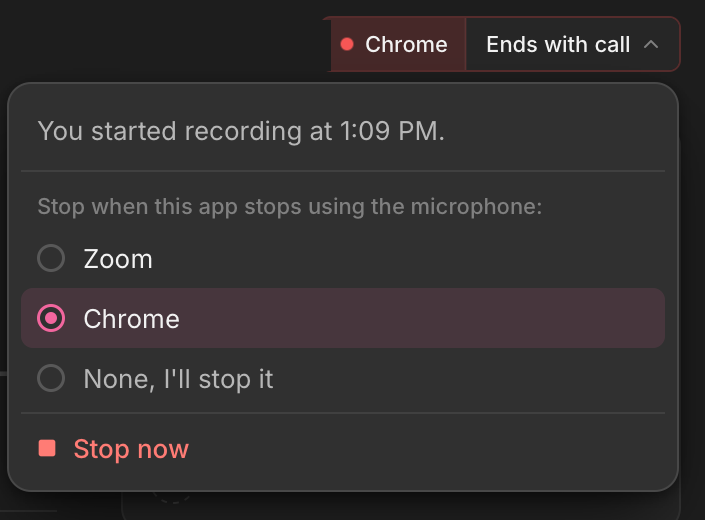
You can add any app as a meeting app, so talat knows when its calls start and end. Each one can auto-record, ask first or do nothing, in Settings > Recording behaviour.
While recording, the title bar names the call talat is recording and says what will end it. Click it to see why the recording started, change which app ends it, add an app talat doesn't know, or stop.
A recording talat started for a call now stops when that call ends. It used to keep going while any other app was using your microphone.
You can connect Outlook and Microsoft 365 calendars in Settings > Calendar, alongside Google and Apple Calendar. It's marked experimental for now.
If your meetings are in a mix of languages, transcripts are more accurate with a newer model, which downloads once after you update.
Features
Insights covers any period from this week to all time, compares it with the one before, and opens the meetings behind a chart when you click it. Each finished meeting has its own Insights tab too, with who said how much and voices you can name.
Setting up talat now asks what should summarise your meetings, and offers Ollama, Claude Code or Codex when they're already on your computer.
Settings > MCP can connect talat to Claude Code, Codex, LM Studio and Bionic, and shows which connections still work.
Speaker matching is better on short remarks, so fewer of them are left unassigned.
A file waiting on the Imports page can be taken out of the queue before it starts, from the X on its row or its context menu.
Improvements
On Windows, talat notices meetings faster, does less work while it waits for one, and works with the latest Windows updates.
You can choose which corner of the screen notifications appear in, and show a test one, in Settings > Notifications.
An automatic summary that starts while another meeting is being summarised now waits its turn instead of being skipped.
Settings > Recording behaviour can set every meeting app to auto-record, ask first or do nothing in one go.
Webex calls are now recognised, so they can auto-record or ask first like any other call.
Helium is now recognised as a browser, so calls in it can auto-record and stop when they end.
Comet is now recognised as a browser, so calls in it can auto-record and stop when they end.
Audio clips for naming or confirming a voice are kept for a week after a meeting instead of three days.
Summaries are given the meeting's start and end in your local time, so the date and time they mention are the ones you saw.
When the window is too narrow to show the transcript and the meeting panel side by side, the panel floats over the transcript instead of squashing it. Transcript lines sit closer together and the page margins are a little narrower.
With Reduce motion turned on in your system settings, the speaker ring, the recording dot and the import indicator hold still.
On a fresh install, notifications stay on screen for 10 seconds instead of 8. Your existing setting is unchanged.
Fixes
Transcripts of long stretches of speech no longer repeat a few words partway through.
Copying a note gives you the text as you typed it, and a line starting with > stays as text.
On a Mac, the local model no longer keeps running in the background, using several GB of memory, after talat restarts to install an update or quits unexpectedly.
Restarting to install an update no longer freezes talat while the update is applied, and clicking Restart twice can't start a second install.
When an update has been found but not downloaded yet, the notification says to open talat and download it, rather than suggesting a restart that wouldn't install anything.
Back no longer lands on a meeting or speaker that has since been deleted.
An automatic summary that needs Claude Code or Codex now tells you when that tool isn't installed, instead of leaving the meeting without a summary or an explanation.
A model download that failed can be retried without restarting talat.
If the call prompt couldn't appear, because notifications were off or another had just shown, talat no longer holds back from prompting later in the same call.
A calendar event that moved while its meeting was being recorded is linked back to that recording once it ends.
Splitting a meeting keeps each learned voice clip with the half it came from.
An imported file is titled with its file name as soon as the import starts, instead of showing New recording for a while.
The split control no longer appears in focus mode.
A new Insights page shows your meeting and dictation time, with trends, a weekly heatmap and the people you meet most.
Import several audio or video files, or a whole folder, at once. They queue on the Imports page, and each one is listed there when it's done instead of opening.
Improvements
Setup on first launch is one sheet in the app's own window, with a preview of what each choice does.
The empty Meetings page shows what else talat does: dictation, calendar, importing and MCP.
A shortcut that another app is holding is flagged in Settings, and talat tries it again when you come back to the app.
Fixes
Codex no longer reaches the web through apps connected to your ChatGPT account when it summarises a meeting or tidies a dictation.
Experimental
The assistant's ear now says what it is doing in words, stays where you put it, and leaves the screen when it isn't needed.
The assistant can search the web, be stopped by voice or with a shortcut, and speak in a choice of thirteen voices. Its settings are on one page.
A meeting set to "Off for this meeting" is no longer kept by the assistant or sent with a later question.
Claude Code can now run Opus 5.5, Sonnet 5.5, Haiku 5.5 and Fable 5.1. Opus, Sonnet and Haiku each have a "latest" option that follows the newest model your Claude Code knows.
Recordings you start yourself, including from the meeting prompt, keep going when the call ends. talat shows a card to say it's still recording.
Features
Meetings can be sent to Slack or Discord, automatically or by hand from the new Send to menu.
Apple Calendar connections let you choose which calendars to sync.
Improvements
A single upcoming meeting can be left out of auto-record, and a recording talat started for you can be declined.
Each meeting can turn its automatic summary off from the meeting's settings.
The on-device summariser is now offered on computers with 8 GB of memory, and Settings shows how long it takes to summarise an hour of meeting on yours.
Dictation can put your clipboard back after it pastes, from its settings.
Auto-stop can be turned off in Settings.
When talat stops a recording because the call ended, it tells you, and Resume picks the same meeting back up.
The home screen loads faster, especially on the first launch after a restart.
Summaries through Ollama no longer come back empty with models that think before answering.
Fixes
The activity log shows Ollama summaries as on-device, matching Settings, instead of as sent to an API.
Experimental
An assistant you can ask questions during and after meetings, running on your own Claude Code or Codex. On Mac it can speak its answers aloud.
A lighter English transcription mode is available on Windows, for machines where the standard models are too heavy. Onboarding recommends it on hardware that needs it.
Improvements
Notifications pause their countdown while your pointer rests on them, with a cue on the card.
Scrolling back up through a long transcript is smoother.
When Claude Code or Codex can't finish a summary, talat now shows the reason.
Update notifications carry a link to the release notes.
Fixes
Notifications no longer take focus from the app you're working in.
Jumping to a search result or a timestamp could land on a blank screen instead of the match.
Auto-export and webhook settings are now actions that run when a recording finishes. You can create several folder and webhook actions, each with its own template, and folder actions can save into date-based subfolders. Your existing settings are converted the first time you open talat.
Export section toggles have been replaced by document templates. The default template controls what an exported file contains, and you can edit it or write your own.
The filename template now lives on each folder action rather than in export settings. Your existing one is copied across.
Features
Notes and Summary share a formatting bar that stays visible as you scroll: headings, bold, italic, lists, links, quotes and code blocks.
Settings > LLMs and Settings > MCP now show recent activity from the local model and your connected tools.
Improvements
Dictation now uses your custom vocabulary.
Speaker labels stabilise earlier during a recording.
Fixes
A subscription talat couldn't confirm had renewed was described as an ended trial; it now warns you three days before your license pauses.
talat now reports a failure when a summary provider returns no content.
On some Windows machines, summaries failed because the local model's context window was too small.
Experimental
Prose transcripts show speech as continuous paragraphs you can edit directly, with a colour mark for each speaker and names and times in the margin.
Meetings open properly when you have no internet connection. An offline machine could leave you on a loading screen, with a new recording missing from your library until you reconnected.
Calls that nobody else spoke in are deleted when they stop, and talat asks first if you did a lot of the talking. Anything you named, took notes on or screenshotted is kept. You can turn this off in settings.
talat can remind you to tell people you're recording when someone else first speaks. Turn on "Disclosure reminder" under Notifications in settings.
Dictation can return you to the app you last dictated into. Turn on "Refocus your last app" in settings.
Pressing esc during dictation gives you two seconds to undo. Under five words it still discards immediately.
The Speakers page has a search box again, matching email addresses as well as names.
Feedback now splits into three paths: report a bug, request a feature on the public roadmap, or leave a testimonial. Bug reports attach your logs, which you can review and switch off before sending.
Improvements
Searches with more than one word match in any order, across meetings, people and transcripts.
Transcript search matches part-way through a word, so results appear as you type.
The meetings list opens faster and stays smooth with hundreds of recordings.
Merging two people leaves you on the person you merged into, rather than back on the list.
You can reach the summary model and prompt settings from an upcoming meeting.
The recording card for a calendar meeting shows the time it was scheduled for.
You can pick Claude Opus 5 or Claude Sonnet 5 for summaries, on both the Claude Code and Anthropic providers.
Fixes
Recordings started from a call notification show the app they were detected in, instead of reading as manual.
When a microphone or system audio device you picked is gone for good, the fallback notice offers "Always use this" so it stops appearing before every call.
An internal warning no longer surfaces as an unexpected error.
When a live transcript splits onto a new line, text you have already read no longer types itself out again.
Save your own named prompts for summaries and dictation, and choose which prompt and model any meeting uses.
Right-click a mis-transcription in a past meeting to correct every instance of it, and talat remembers the mishearing so it's less likely next time.
The names of people in your meetings are now used to help the transcriber spell them right. You can turn this off in settings.
If a recording has been silent for a while, talat tells you and offers to stop it.
Improvements
Recording recovers on its own when a device disconnects or a microphone changes its settings mid-meeting.
Voice prints are learned from a wider range of recordings, and talat now tells you when it learns one.
Fixes
Recording could go deaf mid-meeting if the audio system was disrupted, capturing nothing while the app still showed it recording. talat now spots this and restarts capture.
Merging two meetings no longer loses the second recording's freeform notes and tags.
Notes written on a scheduled meeting that was never recorded were deleted once the event passed. They now appear in your meetings list.
Imported files no longer sit in your Meetings list; they now have their own Imports section in the sidebar, and you can move recordings between the two from either side.
Features
We've revamped our refer a friend scheme: they get $5 off, you get $5. You can now refer people directly from the application.
Tags can be renamed and deleted from settings, and renaming one to match an existing tag merges the two.
The YAML frontmatter on markdown exports is now an editable template, so you can rearrange or add fields and include participant email addresses.
Improvements
Command palette search results now show the date alongside each meeting, and transcript matches include the speaker name.
Your calendar syncs more frequently during the day, which should catch meeting updates more quickly.
Meeting reminder notifications now show the meeting's start and end times alongside its title.
Fixes
Events you declined that were synced through Apple Calendar are now removed from your upcoming meetings list.
Recordings you start yourself are no longer stopped automatically. Auto-stop now applies only to recordings talat starts for a meeting it detects; a manual recording keeps going until you stop it.
Features
You can pick which LLM summarises a specific meeting without changing your default. The summary shows which model produced it.
A new setting identifies the other person in a scheduled one-to-one from their very first word, so talat recognises them in future meetings.
A new 'Ignore very quiet audio' toggle filters out faint microphone pickup, like a TV or a conversation in the next room, so it doesn't reach your transcript.
Improvements
Summaries appear as formatted text while they generate, rather than raw syntax that snaps into shape at the end.
Onboarding now offers a 'Launch at login' toggle on the final step.
Fixes
A manually started recording could be stopped automatically when a background app closed, even though the recording had nothing to do with it.
Dictation cleanup sometimes answered your words instead of tidying them up.
Recurring Apple Calendar events could collapse into a single upcoming meeting, and the same meeting could appear twice if it was in two of your connected accounts.
Summarise meetings and clean up dictation with your own Claude Code or OpenAI Codex installation. talat finds it on your machine automatically.
Improvements
Dictation captures words more faithfully around pauses, no longer clipping the start or end of a phrase.
Fixes
The last words spoken before stopping dictation could be silently dropped if there was a brief pause beforehand.
On some setups, a reasoning model's internal scratchpad could appear in cleaned-up dictation text.
On macOS, talat now recognises when you're in a Discord call. Discord routes its audio through a background helper, which is why talat had previously missed it.
On macOS, you can set the fn key as your dictation hotkey.
A new "Mute other audio" setting silences your system output while you dictate, so music or call audio can't bleed into the transcript. Everything resumes the moment you stop.
Improvements
The transcription models load faster on startup, so there's less waiting before you can record.
Fixes
On Windows, when your chosen audio device couldn't start, talat showed a misleading "Model loading failed" error. It now explains the real problem and points you to Settings > Audio.
Importing an MKV file no longer shows a wildly too-short duration or a progress bar pinned at 100%.
Custom vocabulary no longer stops working mid-meeting when talat briefly misidentifies a short response as a different language.
macOS no longer occasionally launches two copies of talat at login.
Capture a screenshot mid-meeting, from talat's own tool or your usual screenshot shortcut. It sits in the transcript at the moment you took it, and talat reads the on-screen text on your machine so it shows up in search, summaries, and exports.
Focus mode maximises the transcript and folds everything else away, so you can glance back at who said what while a call is still going.
Jump straight to the other meetings in a calendar series from any meeting, or to every meeting a given person spoke in from their profile.
Group people together, say everyone from one company, and attach the words talat should listen for whenever anyone in that group is on the call. A person can belong to as many groups as you like.
A redesigned speakers section puts each person's voice print front and centre, with a review queue where you can confirm the voices talat has matched so it recognises them more reliably next time.
Improvements
Speaker identification is sharper: talat now weighs how closely a voice matches, and how clear-cut that match is, before putting a name to what was said.
Regenerate a meeting's chapters whenever you want, not only when the summary is first written.
Pin a meeting's audio to keep it out of the automatic clean-up, however long you've set recordings to be kept for.
The built-in AI model now loads only when you need it and frees its memory when idle, leaving more headroom for your other apps.
Exports and webhooks can use ISO 8601 dates, and the export webhook can carry custom headers you set.
Give an imported recording its title as you bring it in.
Fixes
Meeting playback no longer stalls or falls silent, and seeking is reliable.
A speaker you've removed from a meeting stays removed, and you can add them back if you change your mind.
On macOS, the built-in AI model now caps itself at roughly an eighth of your system memory, leaving far more headroom for the other apps you're running alongside talat.
The who's here panel now shows who has a voice reference, and flags anyone on a locked channel who's still missing one.
Improvements
Settings are tidied into fewer pages, and the transcription page is now framed around the languages you speak rather than model names.
The MCP settings page covers more clients, including Codex, with a copyable config snippet for editors like Cursor and Cline, and it now works correctly on Windows.
Fixes
“Join and record” now works while talat is still loading its models, instead of being silently ignored: the recording starts as soon as they're ready.
Long stretches of French or Spanish are no longer occasionally transcribed as English partway through.
Dictation has a new streamlined panel: a compact pill with a live waveform in place of the full transcript. Switch to it under Settings → Dictation → Appearance.
Dictation can use its own microphone, separate from the one you record meetings with. It follows your meeting mic by default, or pick a different device just for dictation.
Improvements
Dictation is quicker off the mark: the panel appears the instant you press the hotkey, and your words show up sooner.
When dictation can't start - a meeting is recording, a model is still downloading, or your trial has ended - it now shows a panel explaining why, instead of doing nothing. Press the hotkey again to dismiss it.
On a multi-monitor setup, the dictation panel appears on the screen your cursor is on.
Auto-paste now asks for macOS Accessibility permission before you can turn it on, with a Grant access button when it's needed.
The dictation settings are reordered to read more logically.
Fixes
Dictation no longer drops your first word - the start of what you say is captured from the moment the panel appears.
Anything you say after pressing the hotkey to stop is no longer included in the result.
Esc discards a dictation straight away, and pressing the hotkey again right after stopping no longer fails to pick up the mic.
Dictation mode: press your hotkey, speak, and talat turns what you say into text wherever your cursor is - notes, chat, email, code. A small panel shows the words as you speak them, and the text drops straight into the app you're working in. Tap the hotkey to start and stop, or hold it to talk.
Dictation can tidy what you said before it lands: turn a rambling thought into a clean sentence and fix the names and jargon you use, with a different style saved per app. Every dictation is kept in a history you can revisit, re-run, or copy again.
Import a recording you already have. Drop an audio or video file onto talat, or use the new import button beside Record, and it becomes a full meeting - transcript, speakers, summary, chapters, and action points, just like one you recorded live.
Lock a channel to the people on it, so everything from your microphone, or from system audio, is attributed to whoever's in that channel and stray voices are kept out. A locked channel can hold one person or several, and it replaces the old per-channel default speaker. When a call turns out to be just the two of you, talat offers to set it up partway through.
Improvements
Tools connected over MCP can now hand talat a recording to import, turning an audio or video file into a full meeting just like the new import button does.
If you use Ollama, you can now find, install, and remove its models from inside talat, instead of managing them on the command line.
Save your AI setups as named profiles, then pick which one writes summaries and which cleans up dictation, all from a redesigned settings page.
Collapse the who's here panel and it folds into a slim rail of speaker avatars that light up as each person talks, keeping the room in view without crowding the transcript.
Transcripts in right-to-left scripts like Arabic and Hebrew now align correctly, with the caret on the reading edge as the words stream in.
Exports can include your tags, and you can choose how the meeting details at the top are laid out.
Windows: an integrated title bar replaces the native window chrome.
The sidebar is reorganised, with your recordings now under Meetings and Dictation alongside them.
A clearer first-run screen when you don't have any meetings yet.
Fixes
Meeting playback no longer occasionally runs silent until you restart talat. Previously the timeline would keep moving but no sound came out.
Summaries no longer occasionally come back cut short, with whole sections missing.
Regenerating a summary by hand now refreshes its exports and webhooks too, instead of leaving the old ones in place.
Typing in a settings field no longer jumps the cursor to the end.
Speakers you've named stay put, and are only removed when you delete or merge them.
Chapters split a recording into its topics: a ribbon on the playback bar you can click to rename, drag to retime, or edit freely
After a meeting, talat suggests action points from the conversation, matched to the people on the call. Accept them, assign them, dismiss them, or add your own. Chapters and action points both appear in exports, and each can be switched off in settings
Tools connected over MCP can now update meetings as well as read them: titles, tags, summaries, chapters, and action points
A new on-device engine drives the live transcript: words stream onto the screen as they're spoken, noticeably faster and more accurate than before
Transcribe meetings held in a mix of languages - anything from English to Japanese, Arabic, or Korean. New setups start multilingual; English-only remains available and is a little faster and sharper for English meetings
A new speaker recognition setting makes you the default speaker on your microphone, so your side of the meeting is attributed to you automatically - always, or just on calls
Improvements
Multilingual transcription is much better live: mid-utterance text now comes out correctly in many more languages, keeping native scripts like Arabic, Japanese, Korean, and Hindi instead of romanising them
Speaker avatars on the live transcript show what talat is doing in the moment: listening, tentatively matching a voice, then settling on a name
The meeting's title is generated alongside its summary rather than afterwards
Live text holds its place as speech firms up, instead of reshuffling when a sentence is finalised
First-run setup asks what languages your meetings happen in, and shows the honest download size before you choose
Fixes
Muting during a recording now silences the recording itself, not just the live transcript. Previously, muted speech still ended up in the saved audio
Summaries no longer occasionally arrive with broken formatting
The tray menu no longer gets stuck on "starting up" for the whole session
Audio captured before an in-app update no longer disappears when the app restarts
The window no longer comes back off-screen or on the wrong monitor after a display change
On macOS, the app window opens at its saved position without a visible jump
talat now shows the likely speaker on a line while it's still being spoken
Jump straight to the start or end of a recording by clicking either end of the playback bar
Improvements
talat stays snappy when you open and scroll through long meetings
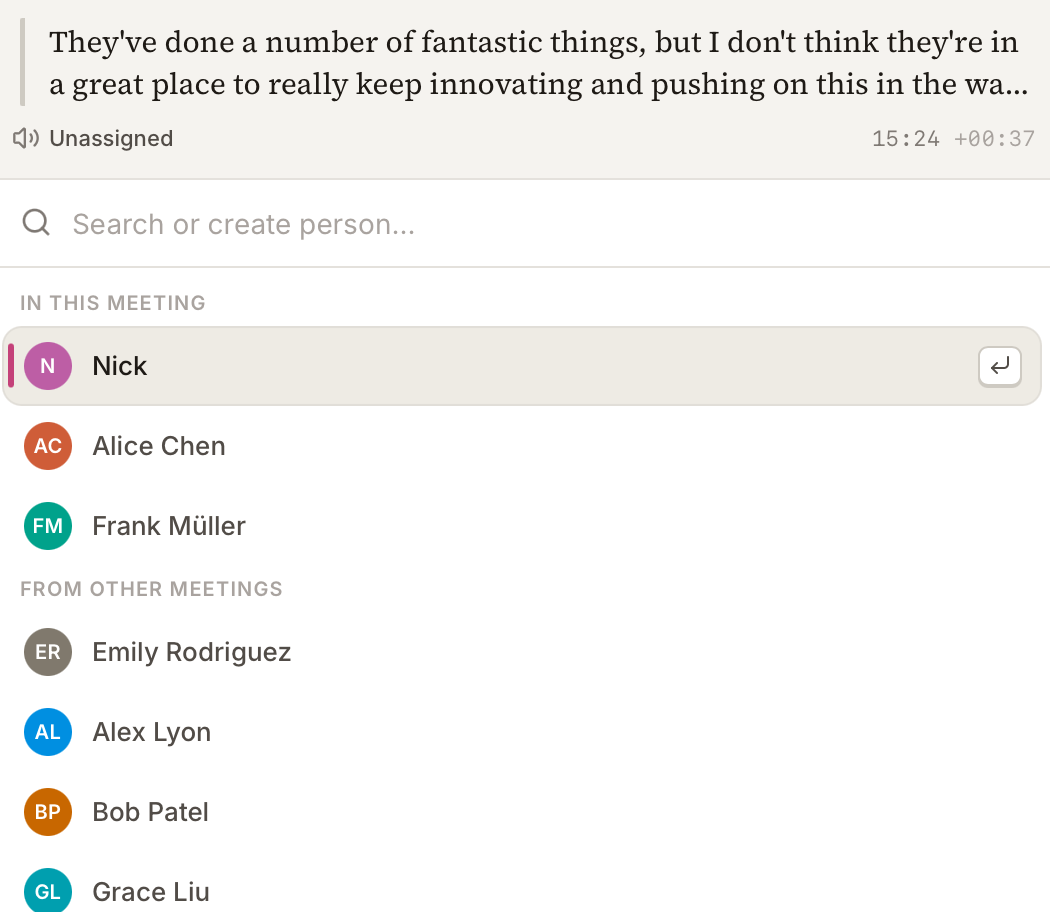
We've redesigned the speaker picker: it's cleaner, and now shows the exact line you're changing so you can see what was said before choosing who said it
Fixes
Re-confirming a speaker who's already on a line no longer disturbs other lines in the meeting
Stopping a recording no longer makes parts of the screen jump as the meeting wraps up
The Join and record button no longer shows on a meeting while another recording is already running
Windows: the installer is around 5 MB smaller to download
Speaker suggestions on the transcript: when talat recognises a voice, it proposes a name, and you accept it or pick someone else
Scan past meetings for a chosen speaker's voice, from their profile, and apply their name across every meeting they appear in
Custom vocabulary: add the names, jargon, and product names talat keeps mishearing, and it spells them correctly
Joining a call now starts the recording with it. The Join button on a meeting-starting notification, and on a scheduled meeting's page, used to just open the call; now both join and begin capturing in one step
Filter a finished transcript by person, to read one speaker's utterances on their own
Improvements
talat stores and downloads its on-device models more efficiently. Opening 0.12 for the first time re-downloads them once
Speaker recognition is more accurate: your own voice is attributed from your first words, overlapping speech is handled better, and longer voice samples keep matching steady over time
On a one-to-one call, talat recognises there are just two of you and offers to label both sides
Correcting a speaker teaches talat that voice for next time, and tells you when it has
Settings are reorganised so things are easier to find
Reworked first-run setup: permissions come first, then you choose your language and whether you want AI summaries, and talat downloads only the models you'll use
The live transcript types in with a blinking caret as someone speaks
Redesigned in-meeting capture controls, with pickers for your microphone and system-audio sources and switching between them without stopping. The pickers list only real inputs, hiding virtual and aggregate devices
A redesigned who's here panel shows who's in the call and how much each person has spoken, stays readable in large meetings, and collapses to give the transcript more room
When you reassign a speaker, the people already in that meeting come first
A clearer interface for the voice references talat uses to recognise each speaker
A tidied-up meeting detail page, with a loading state that matches the transcript layout
Pick your summary provider from a dropdown instead of typing a model name, or turn AI summaries off entirely
Tools connected over MCP can read a meeting's summary and tags, not just its transcript
Set how many upcoming meetings the home screen shows, collapse sections, and reach quick settings without leaving the page
Meeting list rows show each meeting's time range
Improved Webex support on Mac: talat detects the modern Webex app and captures meetings held in it
talat can start hidden in the background, ready in the tray without opening a window
The app stays responsive in long meetings, with the live transcript and surrounding interface redrawing far less often
Fixes
If no microphone is detected, talat records system audio instead of nothing
Pasting into a meeting title or note no longer brings the original formatting with it
Windows: other apps no longer appear to be using your microphone when they aren't
Connecting Apple Calendar for the first time no longer gets stuck on a stale permission
macOS: you can scroll an unfocused window with the mouse wheel without clicking it first
Starting a recording is more reliable, with no duplicate or leftover meetings
The live transcript no longer jumps around as new lines arrive
Correcting a speaker label after a meeting has ended now updates other lines from the same voice in that meeting, matching the behaviour during live meetings.
Google Calendar connection no longer shows an "unverified app" warning. Google has verified talat's calendar access, so the consent screen and the in-app caution banner are both gone.
Fixes
Fixed Microsoft Teams auto-detection on macOS so auto-start picks it up again.
Fixed occasional crashes on macOS when dismissing notifications.
The Discord link on the in-app feedback page now works for everyone. Previously it pointed at a channel that only resolved if you were already a server member.
Auto-start and selective app detection now recognise FaceTime calls. The same fix also covers iPhone calls relayed to your Mac via Continuity and iMessage audio/video calls.
Restored cross-meeting speaker recognition as an opt-in setting. v0.11.1 narrowed speaker matching to the current meeting's participants only, and didn't leave a way to get the previous behaviour back. If recurring calls with the same rotating group of people worked better for you before, the new toggle under Settings → Transcription brings that back.
Adding a participant to a meeting now correctly attributes their earlier speech in that meeting, not only what they say after being added. v0.11.1 accidentally broke this as a side effect of the matching-scope change above; it now works the same way it did before that release. We apologise for both regressions.
Hide calendar events without a join link, or restrict the Upcoming list to specific providers (Meet, Zoom, Teams). The same filters gate calendar notifications and auto-start
Exclude meeting rooms, bots, or anyone else you don't want appearing as a speaker, using glob patterns under Calendar settings
Open recordings on the Summary tab by default when one exists, via a new Appearance setting
Improvements
Speaker matching now sticks to people who are actually in this meeting, instead of guessing from everyone you've ever talked to. Recordings without participants stay unattributed rather than picking up noisy mismatches
Calendar sync keeps existing events up to date if you move them, rename them, swap the join link, or change the invite list
Choose a calendar-day cutoff for your Upcoming list: Today, Today and tomorrow, Next 3 days, or Next 7 days
PDF exports render Cyrillic, Greek and other non-Latin characters correctly (CJK and Arabic still to come)
Notifications no longer stack on top of each other when meeting or microphone state changes in quick succession
Splitting a recording now generates a title, summary, export, and webhook for both halves, and the new half appears in your library immediately. The cut handle also shows up on hover, no right-click needed
'Today' and 'Tomorrow' labels on the home view and meeting pages roll over correctly across local midnight, even when you leave the app open
The 'talat' wordmark in the sidebar is now a shortcut back to your library, and a cog next to Upcoming jumps to Calendar settings
Discord link added to the Feedback page
Fixes
Turning on 'Restrict by source' and unchecking every provider no longer silently empties your Upcoming list
Switching Upcoming filters now refreshes the home view immediately, instead of waiting for the next poll
Better calendar matching for back-to-back meetings: starting a recording mid-call now lands on the right meeting
Upcoming meetings drop off your home screen shortly after they start
Newly-connected Google or Apple calendars sync straight away when you add them
Unmatched audio stays unassigned rather than getting attributed to a fall-back speaker you didn't choose. Star a speaker on the mic or system channel to set your own default
Voice references save correctly when you reassign someone in a recording you've resumed
Theme toggle shows a sun in light mode and a moon in dark, matching the current theme
The 'Remove speaker' action in the side panel is now 'Remove from call', with a clearer icon
Meeting-starting notifications now only respond to clicks on the 'Join call' button
Fixes
Windows: mouse-wheel scrolling over a long summary now scrolls the page
Windows: talat exits cleanly without leaving anything running in the background
Cursor in the summary correctly distinguishes clickable timestamps from editable body text
talat has been redesigned from the ground up: calmer chrome, an editorial transcript layout, a sidebar you can pin open, dedicated tabs for the transcript, notes and summary, and refreshed onboarding. Every screen has had a pass
Connect Apple Calendar (via the system Calendar permission on macOS) to pull upcoming meetings into the library, with attendees mapped to speakers by email and a one-click Join button on every meeting page
Connect a Google Calendar account from Settings → Calendar for the same upcoming-meetings view on machines without Apple Calendar set up, or alongside it. Google support is experimental for this release while we work through Google's verification process, so expect a few rough edges
Speaker identification now runs on the microphone channel too, not just system audio. When two people share a mic, talat splits them into separate speakers automatically; you set your own name during onboarding so the transcript shows you the way you'd rather see yourself, instead of a generic 'You'
Tag any meeting from the side panel, and filter the library by tag, speaker or date
Find and copy the transcript while a recording is still running, not only after it ends
Notes have their own tab on every recording, with timestamped markers that surface on the playback bar so you can jump straight back to anything you flagged
Choose which output device talat captures system audio from, in case you route certain calls through a separate speaker or headset
Configure the filename template used when meetings are exported, and if you rename the recording later the exported file renames itself to match
Optional sticky sidebar: pin the side panel open and it stays open as you move between meetings, instead of collapsing each time
Improvements
The playback bar has been rebuilt: a per-speaker waveform shows who spoke when at a glance, both during a live recording and after it ends; the timeline is correct on multi-session meetings; clicking it mid-recording no longer snaps you back to where you were
Each speaker is assigned a distinct colour automatically, and you can override it with any colour you like; changes apply across the transcript and playback bar instantly
The People page has been overhauled: each speaker now has a full name and email, you can search by either, and the list stays fast with hundreds of speakers; split a speaker if talat lumped two people together, or merge two if it didn't realise they were the same person — merging carries voice references across so matching keeps working
Calendar-sourced meetings bind attendees to speakers by email so the transcript shows real names from the very first segment
The library is more useful: section headers stay sticky as you scroll; library rows show the source of each meeting (Zoom, Meet, Teams, Apple/Google calendar, manual, imported); upcoming events sit alongside what you've already recorded; and a new date-picker filter on Home lets you jump to any day's meetings in one click
Search has been broadened to match speaker names alongside transcript and meeting titles, and the in-app find bar is now available during a live recording too
Audio recordings encode roughly twice as fast at about half the file size, with no audible loss in quality
A heads-up notification fires shortly before scheduled calendar events so you don't miss an auto-detected start
talat remembers where you last left the window between launches, and clamps its size to the current monitor if you've moved displays around
More control over updates in Settings → About — turn auto-checking off entirely, or keep checks on but choose when to download. Useful if your antivirus flags freshly-downloaded installers
Fixes
Update prompts no longer get hidden once your trial has ended
Windows: long meetings now summarise reliably, even when they run well past half an hour
Windows: the 'call in progress' notification now appears when you start a meeting
If you had auto-record turned on, the 'call in progress' prompt could still pop up alongside the recording it had just started — you should now only see one or the other, not both
Fixed a mismatched trial state in the call-in-progress notification
The 'Today' and 'Yesterday' headers in the meetings list now update automatically when the day rolls over, even if you leave the app open across midnight
Split a recording into two separate meetings, for those times when two conversations got captured as one session
Merge two recordings into one, for the inverse: when a single meeting ended up split across two recordings (because you stopped and restarted, or the auto-stop fired too early)
Improvements
Auto-stop now defaults to a one-second grace period after your meeting app releases the mic, with the option to dial it down to zero for an immediate cutoff or higher if you want a longer buffer
Small visual polish on the 'call in progress' notification, including an always-visible close button
Loading an older meeting is smoother, with less flashing as the transcript fills in
Fixes
Windows: fixed a bug that could cause new recordings to come out empty after certain auto-stop sequences, until the app was restarted
Fixed an error that could pop up when reassigning a speaker in a long meeting
The summariser now recovers automatically if it crashes partway through, instead of needing a full restart
Global recording hotkey is now reliable across every modifier combination, including Ctrl-only and Shift+letter shortcuts that previously failed to register
The hotkey feedback sound actually plays when you start or stop a recording
Global keyboard shortcut to start and stop a recording from anywhere, with optional audio feedback
Optional recording timer in the macOS menu bar, so you can see how long you've been at it without coming back to the app
Editable summaries: click anywhere in a summary and start typing, with inline bold, italic, headings, and lists; edits save automatically
New Help tab in settings, including a direct link to book a 15-minute support call if something's gone sideways
Improvements
New status line along the bottom of the window: live recording controls, model readiness, download progress, and update prompts, so you always know what talat is up to
Updates now install cleanly when you quit talat, rather than fighting with the running app
Faster, more reliable model downloads that properly resume if they get interrupted partway through
Summarisation no longer blocks recording: if the local model is still downloading, you can record first and generate the summary once it's ready
Transcription now works reliably with low-quality mics (e.g. 8kHz or 16-bit sources) that weren't being captured properly before
Reassigning speakers uses the same command palette you see elsewhere in the app, with a one-click option to clear a speaker's entire assignment history
The feedback form can optionally include your email so talat can reply, with clear copy about what happens either way
Audio player shows hours:minutes:seconds for long meetings, and the segment play button now actually toggles to pause while playing
The talat window takes focus on launch instead of hiding behind whatever else was on screen
Better support for macOS Tahoe
Fixes
Force-quitting during a download no longer makes the next launch start from scratch
Short recordings that get auto-discarded now navigate home properly and fully release the mic and system audio
Home screen no longer flashes blank
Renaming a meeting refreshes the title on the home screen immediately
Notes you're typing during a live recording no longer get overwritten by incoming transcript events
If talat's transcription engine crashes mid-recording, it now detects it, restarts cleanly, and your meeting is still there when it comes back
Audio playback works on the first click instead of occasionally sitting in silence until you hit play a second time
Summary notifications open the correct meeting when clicked
New three-panel layout: transcript in the centre, collapsible notes and people panels on the sides
Inline notes — jot timestamped thoughts during a live recording, or reply directly to a transcript line to anchor a note in context
Overhauled speaker recognition: tag expected participants before a meeting for better accuracy from the first word, and voice references now build automatically as speakers are identified
Custom summarisation endpoints — point talat at any OpenAI-compatible API, including on-premise or private deployments like AWS Bedrock, corporate proxies, or self-hosted models
Option to hide talat from the Dock and Cmd+Tab switcher so it lives purely in the menu bar
Back and forward navigation in the toolbar, just like Finder
"Meetings" renamed to "recordings" throughout the app — it better reflects how people actually use talat
Improvements
Built-in summarisation model upgraded to Qwen 3.5 4B — noticeably better output, slightly larger download
Models load instantly when already downloaded, even without an internet connection
Live speaker detection is more accurate, with fewer misattributions mid-meeting
Audio files can now be included in auto-export and batch export
You can resume any past recording, regardless of how old it is
Fixes
Recordings stuck in a processing or crashed state now recover automatically on startup
Fixed a layout glitch where live preview text briefly appeared twice after being finalised
Very long recordings (4+ hours) no longer cause the audio processor to spin endlessly in the background
Improved privacy safeguards around feedback and diagnostic logs
Mic device selection now works reliably for non-default microphones
Automatic meeting detection now works for non-admin macOS users
Fixed a rare blank screen on startup caused by a boot-sequence timing issue
Summarisation, export, and webhooks were incorrectly locked behind a license in v0.5.0 (sorry about that). These features are for everyone; the license only gates the recording limit