First impressions of Google AI Edge Foresight
On Tuesday 6 October Google released Foresight, an "experimental Mac application" from its AI Edge team. It records your meetings, transcribes them on your own machine using Google's small Gemma models, and turns your rough notes into proper ones. It's free, and neither the transcription nor the summarisation happens on a server.
That's more or less what we've been building for the last seven months. Meeting notetakers have become an incredibly crowded space in the last six months or so (coincidentally, since TechCrunch wrote about us), especially the local-only and local-first end of it. Google is a big hitter, but then so are all of the incumbents.
I installed it as soon as I could and had a quick play: a few minutes of testing, not a week of real meetings, and I haven't connected my Google Calendar yet. Some of what follows also comes from static analysis of the installer and the application on disk (reading what ships inside the app, without running it), and I'll say so where it does. I'm going to use it properly and I'll update this post when I have.
The short version: the transcription is very good, and almost everything around it is where I feel like talat is still ahead.
Getting started
Foresight is a 153MB download that unpacks to 376MB, before it has fetched a single model. talat is 15MB, and 29MB once it's installed: ten times smaller to download and thirteen times smaller on disk.
You don't need a Google account. I expected a sign-in wall and there isn't one; signing in is only for pulling in your Drive and Calendar.
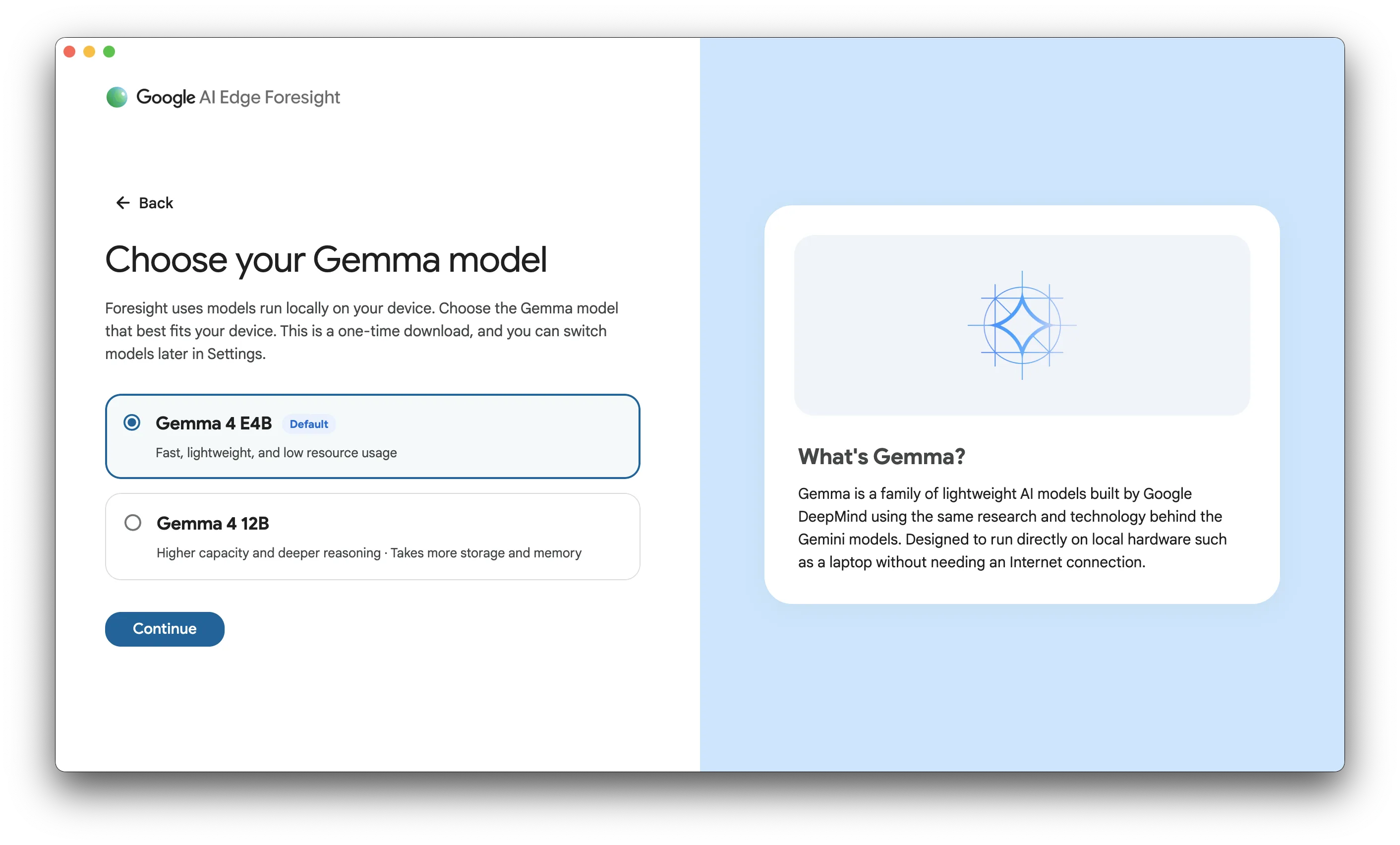
Then you wait. Before you can do anything at all, Foresight downloads about 800MB of small models for speech recognition and search, followed by a 3.41GB language model (the smaller of the two it offered me). From opening the app to being able to press record took about eight and a half minutes on a fast connection. The speech models had finished after two; it made me sit through the other six anyway.
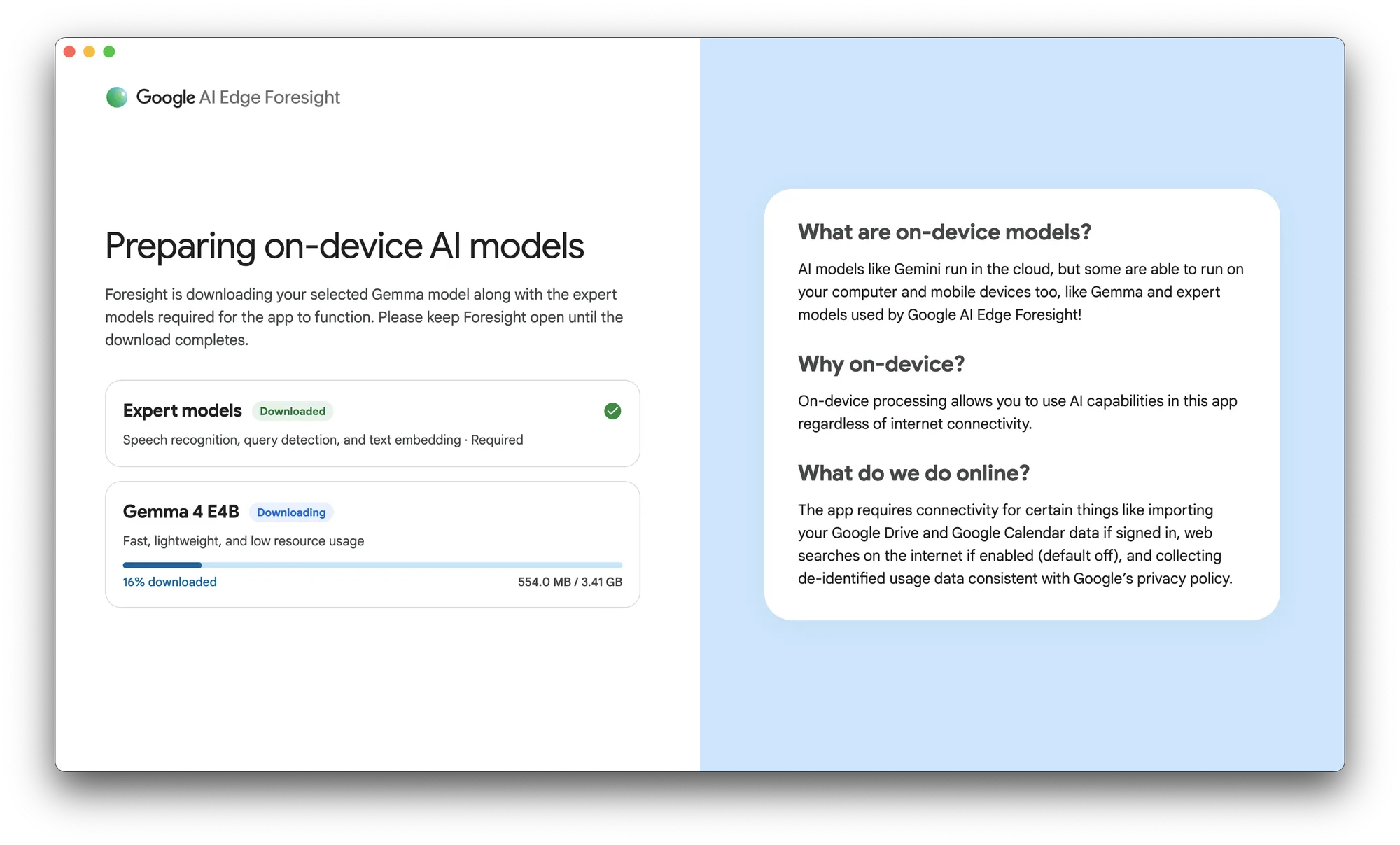
You can't say no to that language model, either; the only choice is which size. talat asks whether you want one at all:
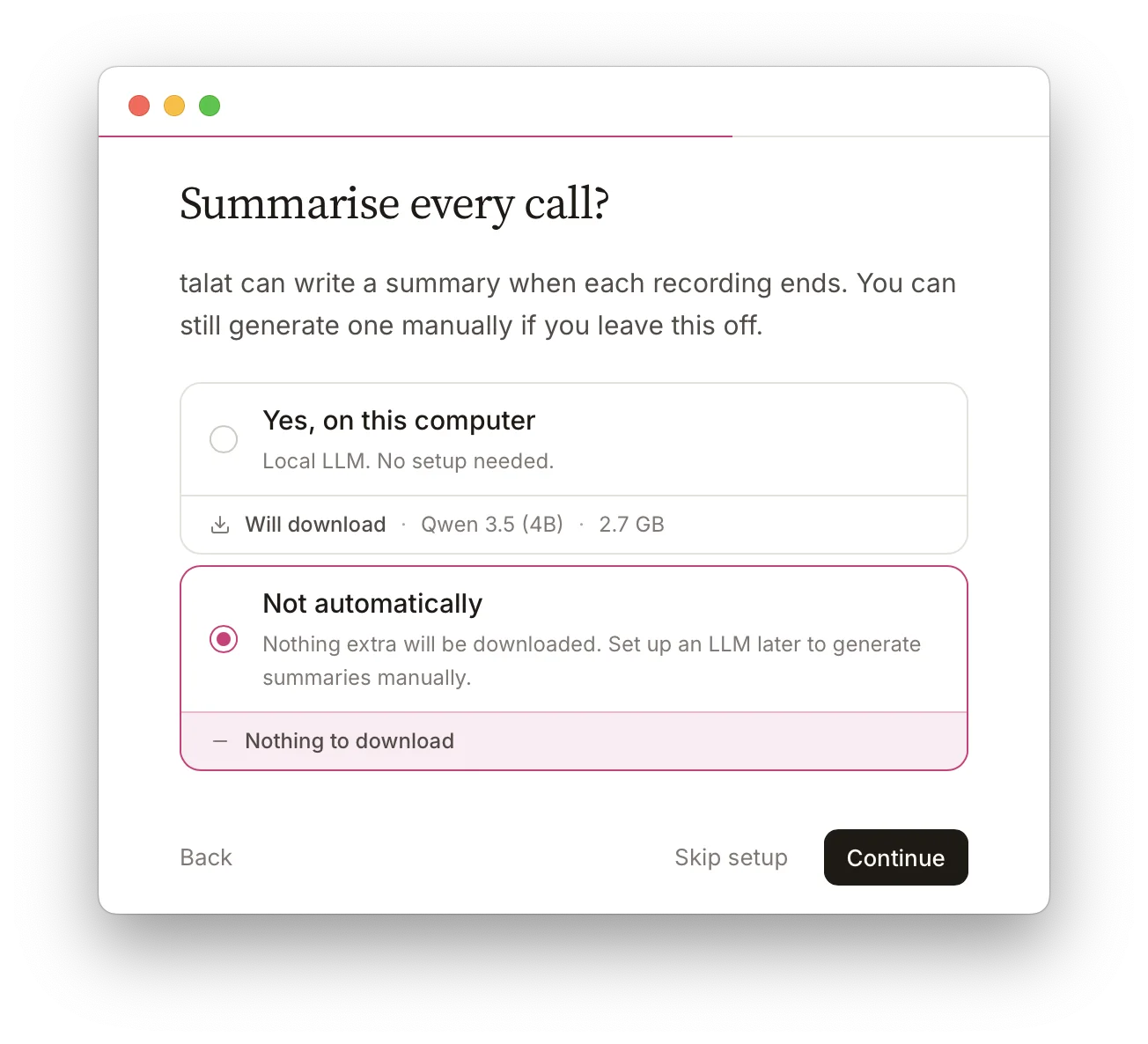
And whichever you pick, you're not stuck with it. You can change the model completely later: a different local one through Ollama, a cloud model with your own key, or Claude Code or Codex if you already use them.
To keep myself honest I wiped my own talat install and ran it from scratch on the same Mac and the same connection. talat has to fetch its speech models before your first recording too (1.4GB of them, which is more than Google's), but that's all it waits for. I was in the app after a minute, most of which was me clicking through onboarding, and recording after three minutes forty, with the summariser still downloading in the background.
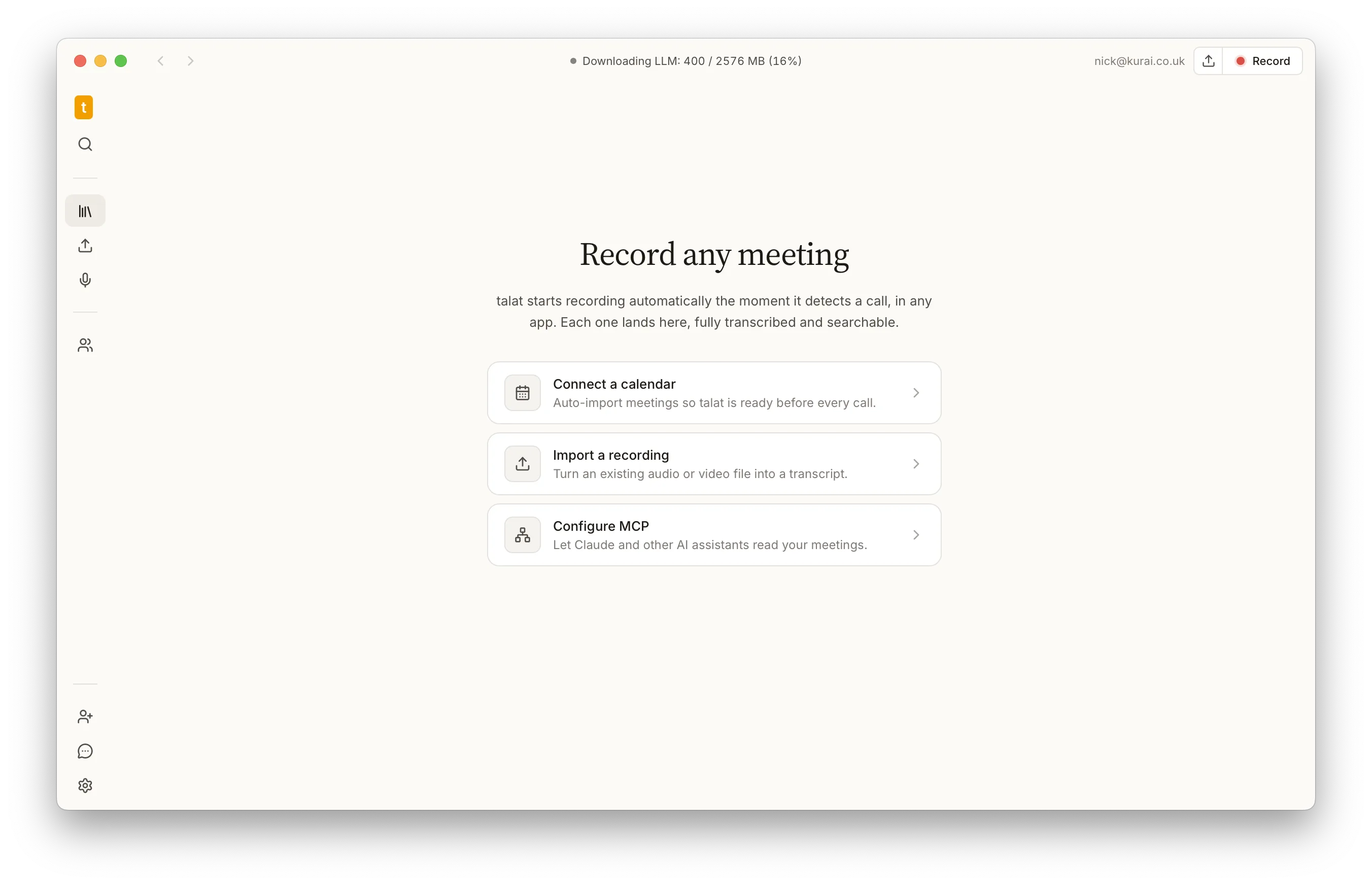
Three minutes forty against eight and a half, and every launch after that is instant.
Auto-recording
Foresight doesn't know when you're on a call. You open the app and press "Start transcribing", and if you forget, that meeting is gone. Going by what's in the app on disk, the nearest it gets is a reminder for meetings in your Google Calendar once you've signed in, which you then have to click. There's nothing in it that watches for Zoom or Teams or Meet starting up.
talat notices. The moment a call starts, in any app, it begins recording by itself and tells you it has, and when the call ends it stops. You can turn that off, or have it ask first. It doesn't need your calendar to do it.
The transcript
The transcription is excellent. Words appear in italics as you speak and firm up a moment later, it's quick, and in English it barely put a foot wrong.
What it can't do is tell you who's speaking. Foresight records your microphone and your computer's sound as two streams and stops there, so every line is either you or everyone else. There are no names, and it doesn't learn anyone's voice. For five people around a table that means the transcript can't tell you who agreed to do what.
It also hides the transcript behind a tab, which tells you where Google thinks the value is. I think the opposite. The longer I work on talat the less I care about summaries and the more I care about the transcript simply being there, with the right name against every line. talat works out who's speaking from their voice and remembers them for next time.
Echo on speakers
Last year I got a bit obsessed with the Mac's Core Audio taps, the bit of macOS that lets an app record what's coming out of your speakers without recording your screen. Foresight uses the same thing. What I learned the hard way is that capturing the sound is the easy part. The moment you take a call on speakers rather than headphones, your microphone hears the other person too, and now you've got everything twice.
Foresight does nothing about that.
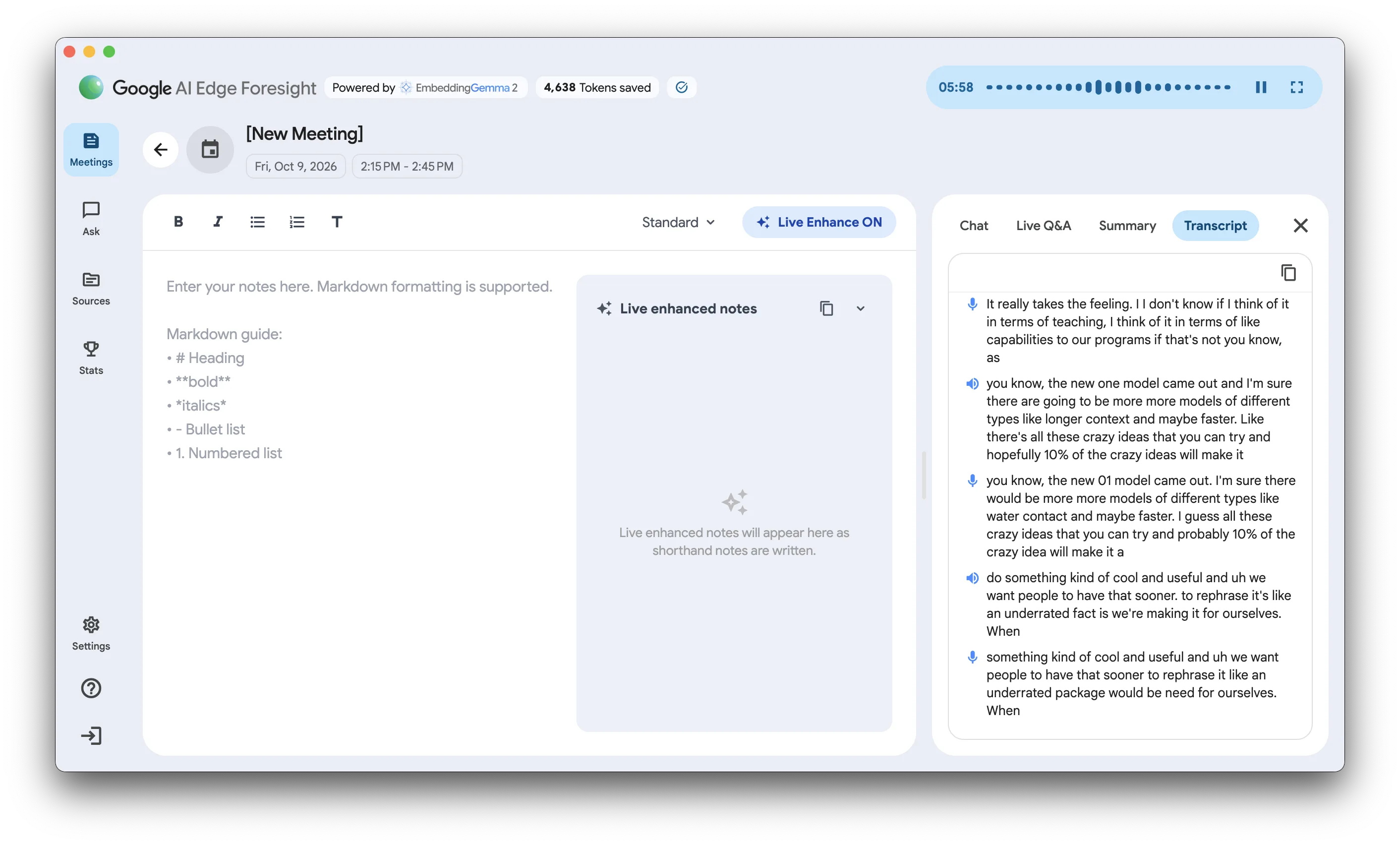
Every line from the other side lands in the transcript twice, once from the computer and once from the room, and the second copy is the worse one: "longer context" came back as "water contact". Both copies then go into your notes and your summary. On headphones it's fine. On a pair of desk speakers, which is hardly exotic, the transcript is a mess.
Cancelling that echo was one of the first pieces of the puzzle we had to solve before talat could exist at all. talat removes it before anything is transcribed, so on speakers you get each line once. It isn't perfect (a very quiet caller can still sneak a duplicate through, and that one's on our list), but it's the difference between a transcript and a mess.
The notes
Foresight is really a notes app. Most of the window is an editor for typing shorthand during a call, and a panel beside it called Live Enhance is meant to rewrite what you've typed into something fuller as the meeting goes on.
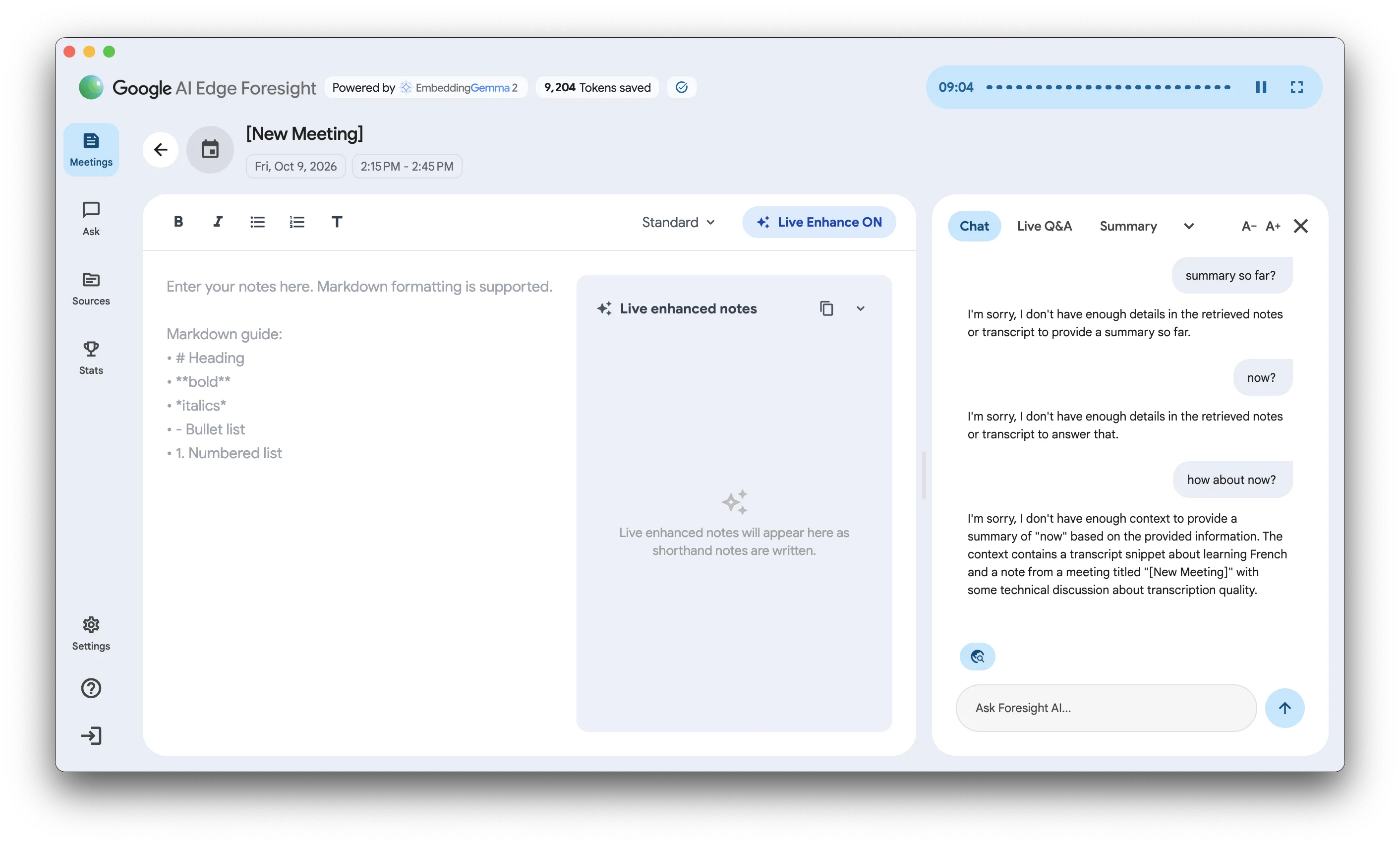
It said "Live Enhance ON" the whole time. I typed a line of notes and nothing happened. It only produced anything after I switched the note style from Standard to Concise and back again, and I only found that by fiddling.
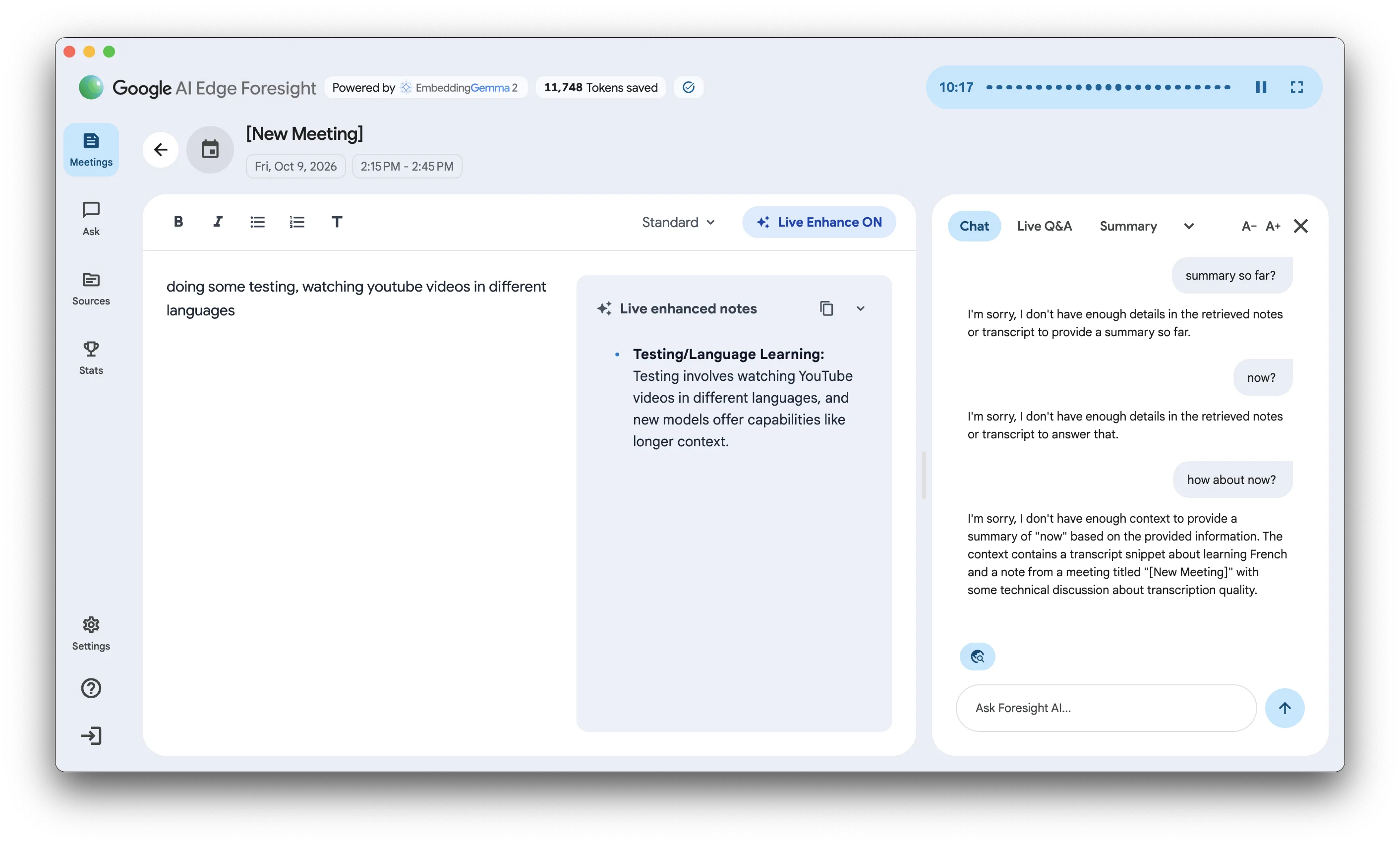
What it eventually wrote was decent: my one lazy line came back as a tidy note with a detail added from the conversation.
The chat beside it was worse. Nine minutes into a recording I asked it for a summary so far, three times, and got three polite apologies.
The summary
When I stopped, the summary it wrote described a meeting that never took place. My recording was about twelve minutes of me, on my own, with a YouTube interview playing and the odd muttered remark in between. Foresight's summary: "the team discussed how to push the boundaries of their product".
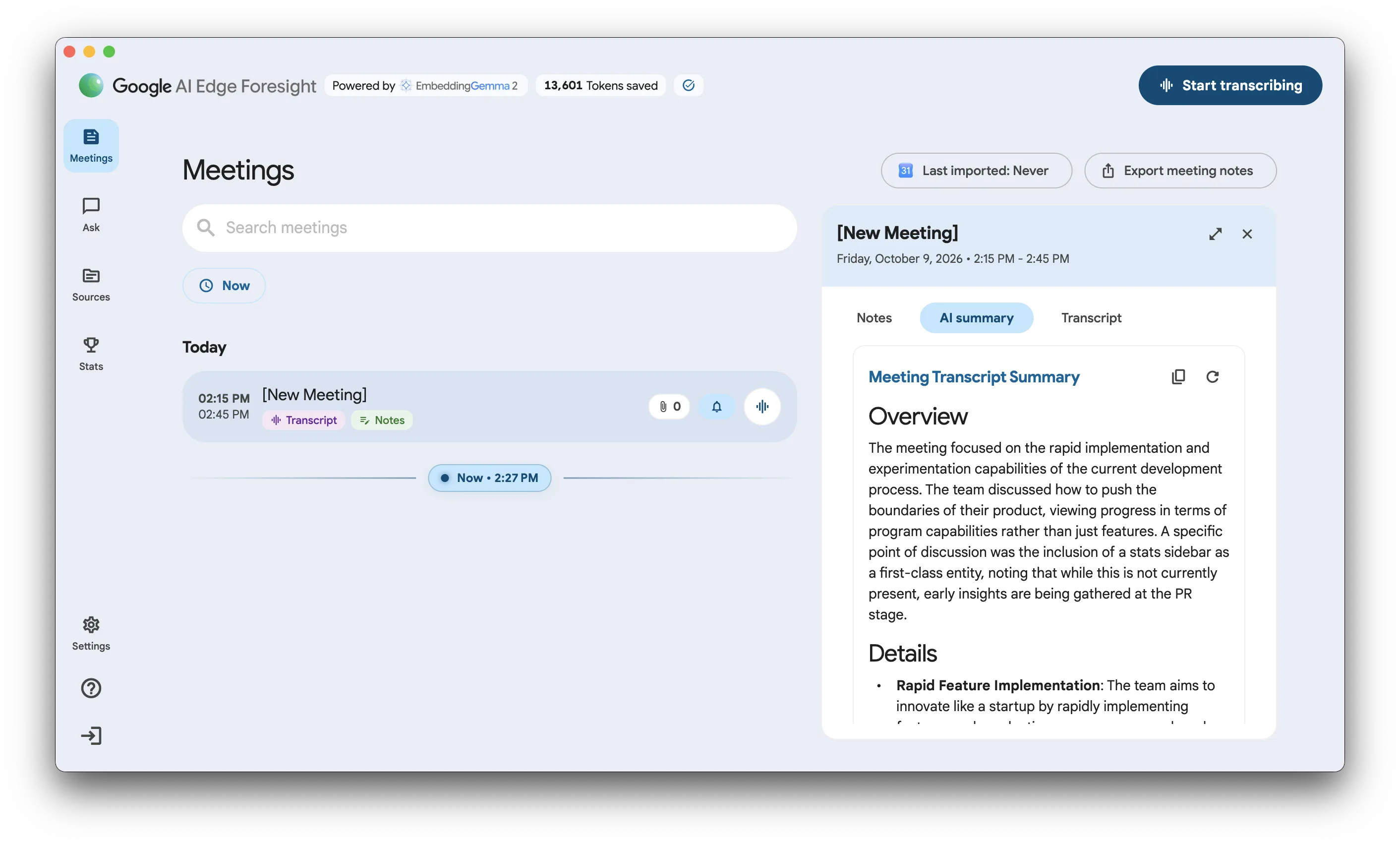
It didn't have much to go on, and I'll test it again on a proper meeting. But it's never going to have much to go on while it has no idea who's talking: the bloke at the desk and the people in the video became one team.
Some of this isn't Google's fault. Models small enough to run on a laptop are limited: they don't have many parameters, they're often squeezed down further to fit, and they can only read so much at once. The summariser we ship with talat doesn't always write a great summary either. That's where local models are today, and anybody who tells you otherwise is selling something.
The difference is what you can do about it. talat's summary, chapters and action items are written from a transcript that knows who said each line, which gives even a small model a fighting chance. And if it still isn't good enough, you can switch summaries off for a meeting, pick a bigger model, or summarise the same meeting again with a different one. With Foresight, what Gemma gives you is what you get.
Stats
Foresight has a Stats page, right there in the sidebar, even in an early version: meetings transcribed, sources added, and a running count of the "tokens saved" by doing all of it on your Mac. People like stats. Wispr Flow has them, and now Google does too.
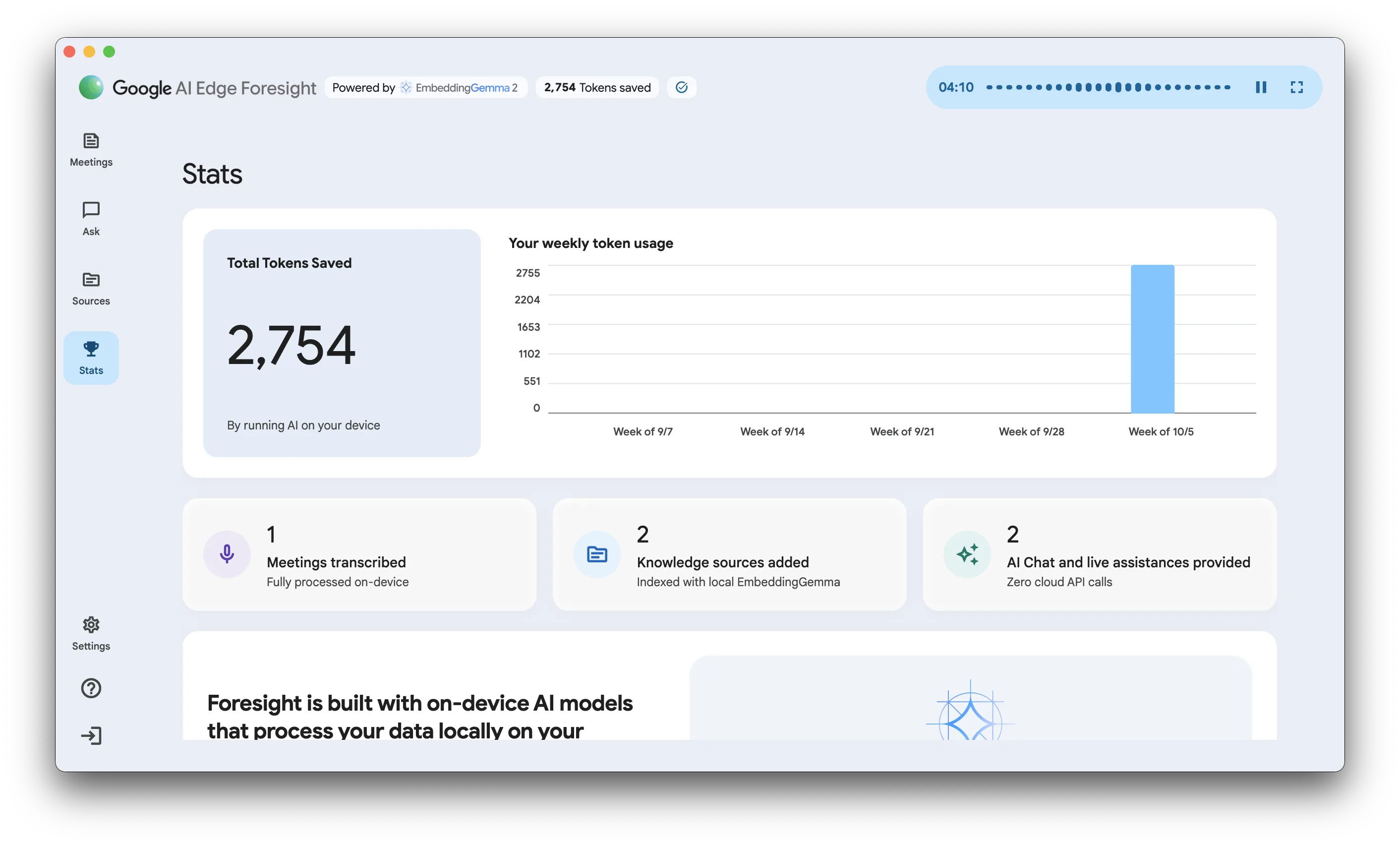
talat doesn't, yet. Funnily enough it's what we're working on at the moment, and have been for a while: we call it Insights, and it covers your meetings, your dictation and the people you talk to. If you'd like to see it (or anything else) sooner, come and badger us on Discord.
Languages
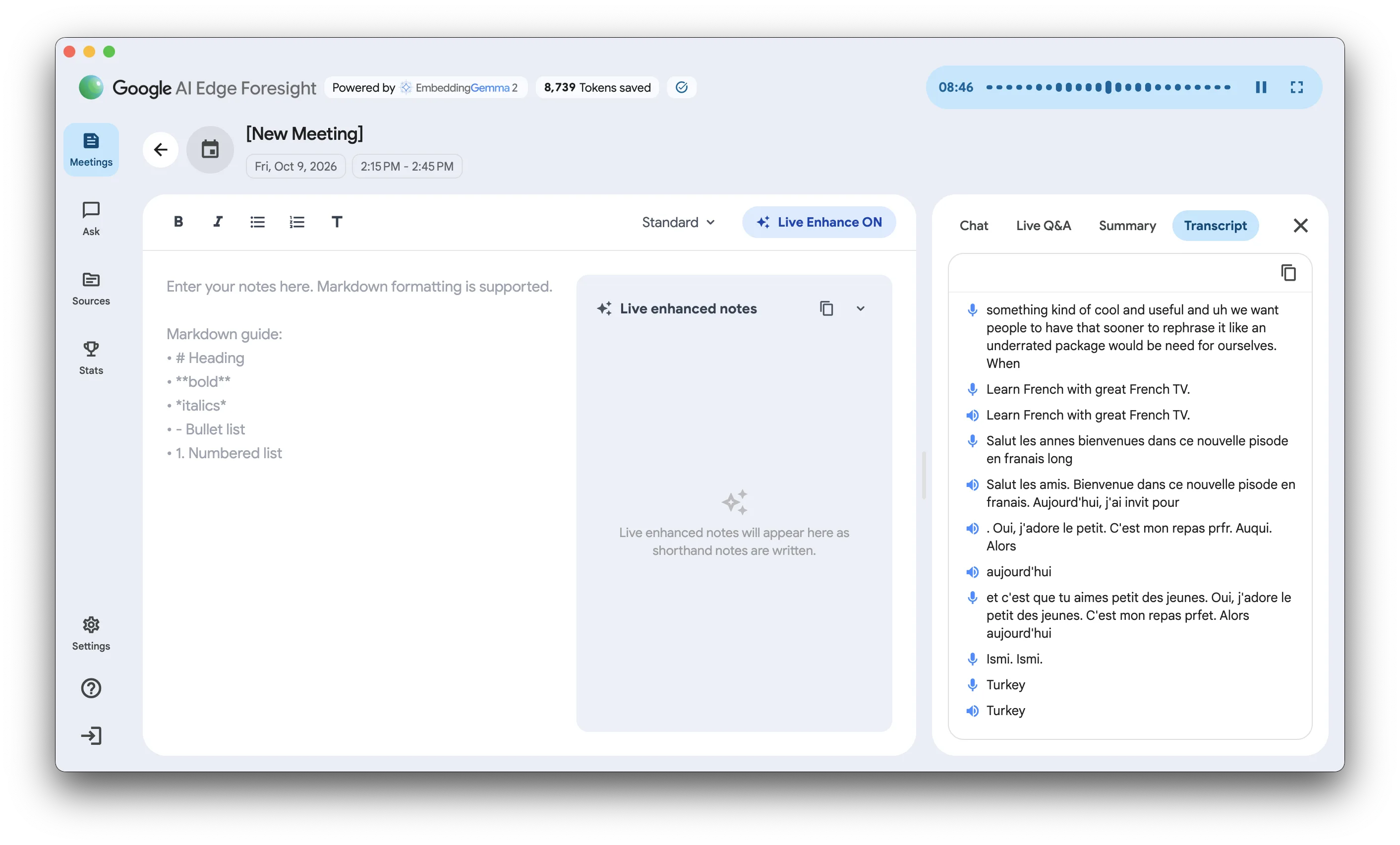
My Mac is set to English, and in English Foresight is great. In French it clearly understood what was being said but couldn't spell it: every accented letter went missing, so "épisode en français" became "pisode en franais". Arabic it couldn't follow at all. I couldn't find a language setting anywhere. It may behave differently on a Mac set to another language, and I haven't tried that.
talat transcribes 33 languages, Arabic included.
Model choice
For the thinking part you get Google's Gemma, in up to three sizes depending on how much memory your Mac has (I was offered two; the third is in the app's files), and that's your lot. There's no other local model and no way to bring your own.
talat ships its own on-device summariser and, as above, lets you swap it for Ollama, a cloud model with your own key, or Claude Code or Codex. Default-private matters, but so does being in control.
Privacy
What you say stays on your Mac. I watched the network while I tested: about 4.2GB of models came down during setup, and nothing that looked like audio or a transcript went anywhere. On the words themselves, Google has done what it says.
Usage data
It isn't silent, though. While I was recording, Foresight was sending a steady trickle of small requests to Google.
The setup screen does tell you about this: the app needs a connection for "collecting de-identified usage data consistent with Google's privacy policy". That's one clause on one screen, there's no switch to turn it off (I looked), and it had started within two seconds of my opening the app for the first time, before I'd signed in to anything. Meanwhile the guide that ships inside the app says it "operates 100% offline".
So I looked at exactly what it sends. The analytics library Foresight uses has a setting that prints every report to the system log in plain text, so I turned that on, recorded for 70 seconds, typed a note, asked the chat a question and wrote a summary. About two minutes of use produced 74 reports of 25 kinds.
Here is every one of them, with the names Google gave them and every field each carried. Nothing from those two minutes is left out. (The app has names for around a hundred kinds of report in all; these are the ones my two minutes set off.) Each report also carries the app version, the platform (macos) and whether the app or the analytics library raised it.
| Report | Times sent | What was in it |
|---|---|---|
meeting_transcription_started | 1 | audio_queries_enabled, has_calendar_event, live_assistant_enabled, model |
meeting_transcription_completed | 1 | duration_seconds, has_calendar_event, model, questions_detected_count, transcript_char_count, transcript_word_count, utterance_count, was_paused |
start_recording_popover_action | 1 | action |
notification_scheduled | 1 | type |
chat_query_submitted | 1 | during_live_transcription, enable_web_search, model, query_word_count, surface |
chat_service_query_completed | 1 | duration_ms, during_live_transcription, enable_web_search, has_audio, has_context, model, query_source, sources_count, ttft_ms |
chat_insight_generated | 1 | during_live_transcription, enable_web_search, model, sources_count, surface |
summary_generated | 1 | is_incremental, is_manual_force, model, priority, source_type, summary_word_count, transcript_word_count, used_map_reduce |
llm_inference_completed | 1 | backend, duration_ms, model, output_char_count, prompt_char_count, task |
notes_manual_enhance_clicked | 2 | force_regenerate, model, shorthand_bullet_count, shorthand_word_count, style |
notes_enhanced | 1 | enhanced_bullet_count, missed_topics_count, missed_topics_shown, mode, model, scribble_bullet_count, style, total_bullet_count, update_existing |
knowledge_base_composition | 3 | doc_count, drive_count, image_count, local_count, note_count, other_count, pdf_count, sheet_count, slide_count, text_count, total_count, transcript_summary_count, url_count |
knowledge_source_embedded | 4 | category, char_length, is_calendar_attachment, mime_type, source_origin |
tokens_saved | 29 | count, is_output, model, task |
app_tab_selected | 3 | previous_tab, tab |
note_session_tab_selected | 3 | during_live_transcription, is_immersive, tab |
app_open | 1 | nothing else |
app_initialization_completed | 1 | duration_ms, in_onboarding, model, signed_in |
auth_state_initialized | 1 | signed_in |
module_initialization_started | 4 | in_onboarding, module |
module_initialization_completed | 4 | duration_ms, in_onboarding, model, module |
model_download_started | 2 | in_onboarding, model, model_category |
model_download_completed | 2 | duration_ms, in_onboarding, model, model_category |
_s | 1 | _sid, _sno |
_e | 4 | _et |
In plain English, that's:
- For each meeting: how long it lasted in seconds, how many words were said, how many characters, how many separate utterances, how many questions it detected, whether I paused it, whether it was attached to a calendar event, and whether the live assistant and audio questions were switched on.
- For each chat question: how many words were in it, whether web search was on, how long the answer took, how long before the first word appeared, and how many of my documents it drew on.
- For each summary and each note: how many words were in the transcript and the summary, how many characters went into the model and came out, how many bullets I typed and how many it wrote, and which style I'd picked.
- For my library: how many documents I have, counted by kind (documents, Drive files, images, local files, notes, PDFs, spreadsheets, slides, text files, links), and for each thing added, its length in characters and its type.
- Running totals of how many tokens each kind of task used, sent 29 times in two minutes.
- Around all of that: which tabs I opened, which model I'd installed, how long each stage of startup took, and whether I was signed in.
What was not in there: any of my words. I took ninety distinctive words from that recording and my note and searched every report for them, and found none. Nothing was tied to a Google account either, because I hadn't signed in; the reports hang off an anonymous id for the install. So "de-identified usage data" is an accurate description, and I don't want to suggest otherwise. I also haven't tested it signed in, so I can't tell you whether anything changes when you are.
But look at that table again. It's a silhouette of your working day: every meeting, how long it ran, how much was said in it, how many questions came up, whether it was in your diary. All of the shape with none of the words. Most people who use Foresight will connect their Google Calendar as well, at which point Google holds the diary too.
I don't think any of this is sinister. I do think most people would wince if they saw it written down, I can't see why a notetaker needs to report how many questions were asked in my meeting, and "100% offline" is not how I'd describe it.
For comparison, here is everything talat sends: the app version, whether you're on Mac or Windows, a random id for the install, and how far you got through onboarding. If you've paid, an opaque licence id so we can tell the licence is still valid. If you're on the free trial, the total number of seconds you've used, so the trial can't be reset. That's it, a few times a day. Nothing per meeting, nothing about what you recorded or for how long, and no account. We wrote it all up in our 1.0.0 post.
Background processes
Two things I only found afterwards, and neither is mentioned anywhere in the app.
I quit Foresight. Half an hour later a helper process of its was still running in the background, holding on to a couple of hundred megabytes of memory.
It had also installed a background job that reopens Foresight, hidden, every four hours to "refresh calendar events". I hadn't signed in and I hadn't connected a calendar.
The only way talat starts itself is a "Launch at login" switch in Settings, and it's off until you turn it on.
Mac only
Foresight needs an Apple silicon Mac. One report says Windows might follow if this goes well, though Google hasn't said so itself.
That's a bigger job than it sounds. Everything above about capturing a call is built on something only Apple provides, and Windows needs its own version of all of it, echo and device-switching included. talat runs on both today.
Dictation, import and playback
A few things talat does that Foresight doesn't, at least not yet.
It dictates. Press a key in any app, talk, and the words land where your cursor is, using the same on-device engine as your meetings. Foresight has nothing like it (Google has a separate dictation app).
It imports recordings. Give talat an audio or video file and you get the same transcript, speakers and summary as a live call. Foresight will take audio files into its library so you can search them, but as far as I can tell it doesn't turn them into a meeting.
And it keeps the audio. Foresight stores the transcript and throws the recording away; talat keeps it on your machine, so you can play it back alongside the transcript and hear what was actually said.
Which to use
If you're on a Mac, you take your own notes, you live in Google's tools and your calls are one-to-one on headphones, Foresight is free and worth a look. It also has an idea I haven't tested yet, answering a question from your own documents the moment somebody asks it on a call, and I'll report back on that when I've used it properly.
For everything else, I'd still use talat, and not only because we built it. It tells you who said what. It copes with sound playing through your speakers. It runs on Windows. It transcribes 33 languages. It lets you choose the model that writes your summaries, or turn summaries off altogether. It dictates, and it imports recordings. It starts recording when your call starts. It's a tenth of the download. It doesn't make you wait eight minutes to press record. You can try it free for ten hours without creating an account.
If you'd rather see all of this side by side, there's a talat and Foresight comparison page with the lot in one table.