Chapters split a recording into its topics: a ribbon on the playback bar you can click to rename, drag to retime, or edit freely
After a meeting, talat suggests action points from the conversation, matched to the people on the call. Accept them, assign them, dismiss them, or add your own. Chapters and action points both appear in exports, and each can be switched off in settings
Tools connected over MCP can now update meetings as well as read them: titles, tags, summaries, chapters, and action points
A new on-device engine drives the live transcript: words stream onto the screen as they're spoken, noticeably faster and more accurate than before
Transcribe meetings held in a mix of languages - anything from English to Japanese, Arabic, or Korean. New setups start multilingual; English-only remains available and is a little faster and sharper for English meetings
A new speaker recognition setting makes you the default speaker on your microphone, so your side of the meeting is attributed to you automatically - always, or just on calls
Improvements
Multilingual transcription is much better live: mid-utterance text now comes out correctly in many more languages, keeping native scripts like Arabic, Japanese, Korean, and Hindi instead of romanising them
Speaker avatars on the live transcript show what talat is doing in the moment: listening, tentatively matching a voice, then settling on a name
The meeting's title is generated alongside its summary rather than afterwards
Live text holds its place as speech firms up, instead of reshuffling when a sentence is finalised
First-run setup asks what languages your meetings happen in, and shows the honest download size before you choose
Fixes
Muting during a recording now silences the recording itself, not just the live transcript. Previously, muted speech still ended up in the saved audio
Summaries no longer occasionally arrive with broken formatting
The tray menu no longer gets stuck on "starting up" for the whole session
Audio captured before an in-app update no longer disappears when the app restarts
The window no longer comes back off-screen or on the wrong monitor after a display change
On macOS, the app window opens at its saved position without a visible jump
talat now shows the likely speaker on a line while it's still being spoken
Jump straight to the start or end of a recording by clicking either end of the playback bar
Improvements
talat stays snappy when you open and scroll through long meetings
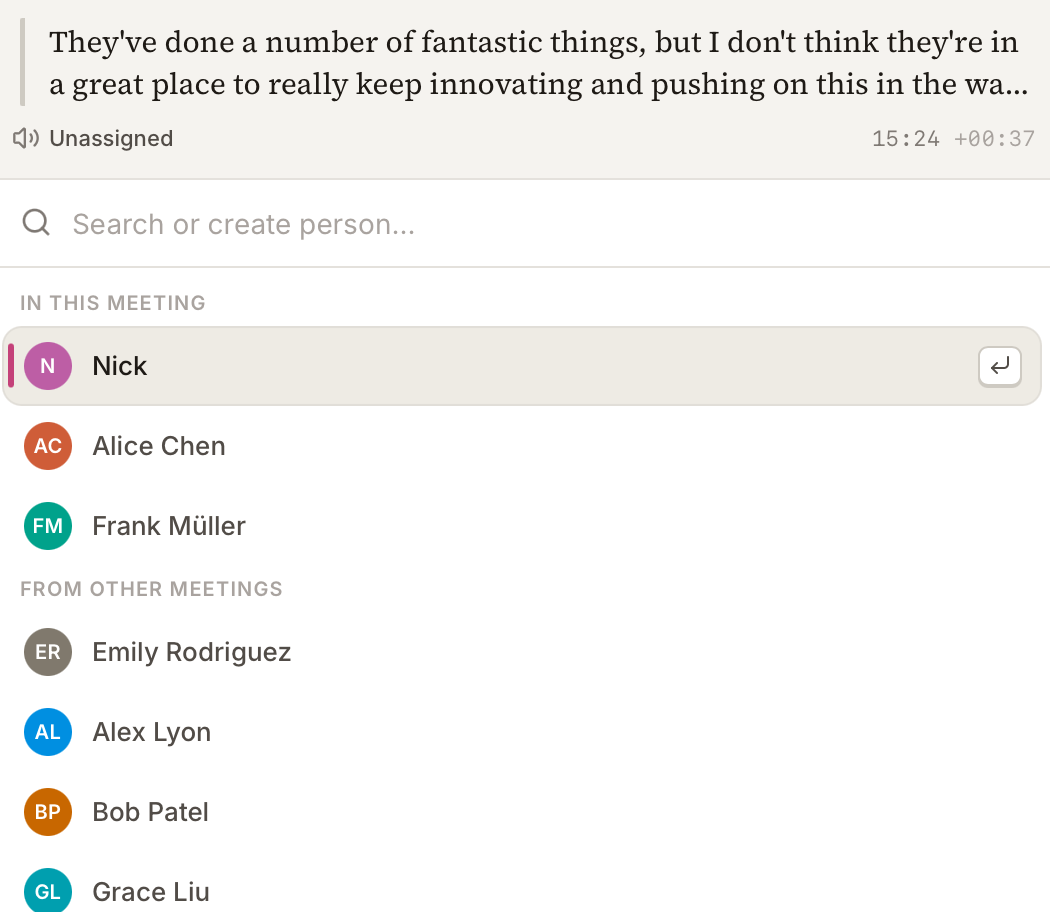
We've redesigned the speaker picker: it's cleaner, and now shows the exact line you're changing so you can see what was said before choosing who said it
Fixes
Re-confirming a speaker who's already on a line no longer disturbs other lines in the meeting
Stopping a recording no longer makes parts of the screen jump as the meeting wraps up
The Join and record button no longer shows on a meeting while another recording is already running
Windows: the installer is around 5 MB smaller to download
Speaker suggestions on the transcript: when talat recognises a voice, it proposes a name, and you accept it or pick someone else
Scan past meetings for a chosen speaker's voice, from their profile, and apply their name across every meeting they appear in
Custom vocabulary: add the names, jargon, and product names talat keeps mishearing, and it spells them correctly
Joining a call now starts the recording with it. The Join button on a meeting-starting notification, and on a scheduled meeting's page, used to just open the call; now both join and begin capturing in one step
Filter a finished transcript by person, to read one speaker's utterances on their own
Improvements
talat stores and downloads its on-device models more efficiently. Opening 0.12 for the first time re-downloads them once
Speaker recognition is more accurate: your own voice is attributed from your first words, overlapping speech is handled better, and longer voice samples keep matching steady over time
On a one-to-one call, talat recognises there are just two of you and offers to label both sides
Correcting a speaker teaches talat that voice for next time, and tells you when it has
Settings are reorganised so things are easier to find
Reworked first-run setup: permissions come first, then you choose your language and whether you want AI summaries, and talat downloads only the models you'll use
The live transcript types in with a blinking caret as someone speaks
Redesigned in-meeting capture controls, with pickers for your microphone and system-audio sources and switching between them without stopping. The pickers list only real inputs, hiding virtual and aggregate devices
A redesigned who's here panel shows who's in the call and how much each person has spoken, stays readable in large meetings, and collapses to give the transcript more room
When you reassign a speaker, the people already in that meeting come first
A clearer interface for the voice references talat uses to recognise each speaker
A tidied-up meeting detail page, with a loading state that matches the transcript layout
Pick your summary provider from a dropdown instead of typing a model name, or turn AI summaries off entirely
Tools connected over MCP can read a meeting's summary and tags, not just its transcript
Set how many upcoming meetings the home screen shows, collapse sections, and reach quick settings without leaving the page
Meeting list rows show each meeting's time range
Improved Webex support on Mac: talat detects the modern Webex app and captures meetings held in it
talat can start hidden in the background, ready in the tray without opening a window
The app stays responsive in long meetings, with the live transcript and surrounding interface redrawing far less often
Fixes
If no microphone is detected, talat records system audio instead of nothing
Pasting into a meeting title or note no longer brings the original formatting with it
Windows: other apps no longer appear to be using your microphone when they aren't
Connecting Apple Calendar for the first time no longer gets stuck on a stale permission
macOS: you can scroll an unfocused window with the mouse wheel without clicking it first
Starting a recording is more reliable, with no duplicate or leftover meetings
The live transcript no longer jumps around as new lines arrive
Correcting a speaker label after a meeting has ended now updates other lines from the same voice in that meeting, matching the behaviour during live meetings.
Google Calendar connection no longer shows an "unverified app" warning. Google has verified talat's calendar access, so the consent screen and the in-app caution banner are both gone.
Fixes
Fixed Microsoft Teams auto-detection on macOS so auto-start picks it up again.
Fixed occasional crashes on macOS when dismissing notifications.
The Discord link on the in-app feedback page now works for everyone. Previously it pointed at a channel that only resolved if you were already a server member.
Auto-start and selective app detection now recognise FaceTime calls. The same fix also covers iPhone calls relayed to your Mac via Continuity and iMessage audio/video calls.
Restored cross-meeting speaker recognition as an opt-in setting. v0.11.1 narrowed speaker matching to the current meeting's participants only, and didn't leave a way to get the previous behaviour back. If recurring calls with the same rotating group of people worked better for you before, the new toggle under Settings → Transcription brings that back.
Adding a participant to a meeting now correctly attributes their earlier speech in that meeting, not only what they say after being added. v0.11.1 accidentally broke this as a side effect of the matching-scope change above; it now works the same way it did before that release. We apologise for both regressions.
Hide calendar events without a join link, or restrict the Upcoming list to specific providers (Meet, Zoom, Teams). The same filters gate calendar notifications and auto-start
Exclude meeting rooms, bots, or anyone else you don't want appearing as a speaker, using glob patterns under Calendar settings
Open recordings on the Summary tab by default when one exists, via a new Appearance setting
Improvements
Speaker matching now sticks to people who are actually in this meeting, instead of guessing from everyone you've ever talked to. Recordings without participants stay unattributed rather than picking up noisy mismatches
Calendar sync keeps existing events up to date if you move them, rename them, swap the join link, or change the invite list
Choose a calendar-day cutoff for your Upcoming list: Today, Today and tomorrow, Next 3 days, or Next 7 days
PDF exports render Cyrillic, Greek and other non-Latin characters correctly (CJK and Arabic still to come)
Notifications no longer stack on top of each other when meeting or microphone state changes in quick succession
Splitting a recording now generates a title, summary, export, and webhook for both halves, and the new half appears in your library immediately. The cut handle also shows up on hover, no right-click needed
'Today' and 'Tomorrow' labels on the home view and meeting pages roll over correctly across local midnight, even when you leave the app open
The 'talat' wordmark in the sidebar is now a shortcut back to your library, and a cog next to Upcoming jumps to Calendar settings
Discord link added to the Feedback page
Fixes
Turning on 'Restrict by source' and unchecking every provider no longer silently empties your Upcoming list
Switching Upcoming filters now refreshes the home view immediately, instead of waiting for the next poll
Better calendar matching for back-to-back meetings: starting a recording mid-call now lands on the right meeting
Upcoming meetings drop off your home screen shortly after they start
Newly-connected Google or Apple calendars sync straight away when you add them
Unmatched audio stays unassigned rather than getting attributed to a fall-back speaker you didn't choose. Star a speaker on the mic or system channel to set your own default
Voice references save correctly when you reassign someone in a recording you've resumed
Theme toggle shows a sun in light mode and a moon in dark, matching the current theme
The 'Remove speaker' action in the side panel is now 'Remove from call', with a clearer icon
Meeting-starting notifications now only respond to clicks on the 'Join call' button
Fixes
Windows: mouse-wheel scrolling over a long summary now scrolls the page
Windows: talat exits cleanly without leaving anything running in the background
Cursor in the summary correctly distinguishes clickable timestamps from editable body text
talat has been redesigned from the ground up: calmer chrome, an editorial transcript layout, a sidebar you can pin open, dedicated tabs for the transcript, notes and summary, and refreshed onboarding. Every screen has had a pass
Connect Apple Calendar (via the system Calendar permission on macOS) to pull upcoming meetings into the library, with attendees mapped to speakers by email and a one-click Join button on every meeting page
Connect a Google Calendar account from Settings → Calendar for the same upcoming-meetings view on machines without Apple Calendar set up, or alongside it. Google support is experimental for this release while we work through Google's verification process, so expect a few rough edges
Speaker identification now runs on the microphone channel too, not just system audio. When two people share a mic, talat splits them into separate speakers automatically; you set your own name during onboarding so the transcript shows you the way you'd rather see yourself, instead of a generic 'You'
Tag any meeting from the side panel, and filter the library by tag, speaker or date
Find and copy the transcript while a recording is still running, not only after it ends
Notes have their own tab on every recording, with timestamped markers that surface on the playback bar so you can jump straight back to anything you flagged
Choose which output device talat captures system audio from, in case you route certain calls through a separate speaker or headset
Configure the filename template used when meetings are exported, and if you rename the recording later the exported file renames itself to match
Optional sticky sidebar: pin the side panel open and it stays open as you move between meetings, instead of collapsing each time
Improvements
The playback bar has been rebuilt: a per-speaker waveform shows who spoke when at a glance, both during a live recording and after it ends; the timeline is correct on multi-session meetings; clicking it mid-recording no longer snaps you back to where you were
Each speaker is assigned a distinct colour automatically, and you can override it with any colour you like; changes apply across the transcript and playback bar instantly
The People page has been overhauled: each speaker now has a full name and email, you can search by either, and the list stays fast with hundreds of speakers; split a speaker if talat lumped two people together, or merge two if it didn't realise they were the same person — merging carries voice references across so matching keeps working
Calendar-sourced meetings bind attendees to speakers by email so the transcript shows real names from the very first segment
The library is more useful: section headers stay sticky as you scroll; library rows show the source of each meeting (Zoom, Meet, Teams, Apple/Google calendar, manual, imported); upcoming events sit alongside what you've already recorded; and a new date-picker filter on Home lets you jump to any day's meetings in one click
Search has been broadened to match speaker names alongside transcript and meeting titles, and the in-app find bar is now available during a live recording too
Audio recordings encode roughly twice as fast at about half the file size, with no audible loss in quality
A heads-up notification fires shortly before scheduled calendar events so you don't miss an auto-detected start
talat remembers where you last left the window between launches, and clamps its size to the current monitor if you've moved displays around
More control over updates in Settings → About — turn auto-checking off entirely, or keep checks on but choose when to download. Useful if your antivirus flags freshly-downloaded installers
Fixes
Update prompts no longer get hidden once your trial has ended
Windows: long meetings now summarise reliably, even when they run well past half an hour
Windows: the 'call in progress' notification now appears when you start a meeting
If you had auto-record turned on, the 'call in progress' prompt could still pop up alongside the recording it had just started — you should now only see one or the other, not both
Fixed a mismatched trial state in the call-in-progress notification
The 'Today' and 'Yesterday' headers in the meetings list now update automatically when the day rolls over, even if you leave the app open across midnight
Split a recording into two separate meetings, for those times when two conversations got captured as one session
Merge two recordings into one, for the inverse: when a single meeting ended up split across two recordings (because you stopped and restarted, or the auto-stop fired too early)
Improvements
Auto-stop now defaults to a one-second grace period after your meeting app releases the mic, with the option to dial it down to zero for an immediate cutoff or higher if you want a longer buffer
Small visual polish on the 'call in progress' notification, including an always-visible close button
Loading an older meeting is smoother, with less flashing as the transcript fills in
Fixes
Windows: fixed a bug that could cause new recordings to come out empty after certain auto-stop sequences, until the app was restarted
Fixed an error that could pop up when reassigning a speaker in a long meeting
The summariser now recovers automatically if it crashes partway through, instead of needing a full restart
Global recording hotkey is now reliable across every modifier combination, including Ctrl-only and Shift+letter shortcuts that previously failed to register
The hotkey feedback sound actually plays when you start or stop a recording
Global keyboard shortcut to start and stop a recording from anywhere, with optional audio feedback
Optional recording timer in the macOS menu bar, so you can see how long you've been at it without coming back to the app
Editable summaries: click anywhere in a summary and start typing, with inline bold, italic, headings, and lists; edits save automatically
New Help tab in settings, including a direct link to book a 15-minute support call if something's gone sideways
Improvements
New status line along the bottom of the window: live recording controls, model readiness, download progress, and update prompts, so you always know what talat is up to
Updates now install cleanly when you quit talat, rather than fighting with the running app
Faster, more reliable model downloads that properly resume if they get interrupted partway through
Summarisation no longer blocks recording: if the local model is still downloading, you can record first and generate the summary once it's ready
Transcription now works reliably with low-quality mics (e.g. 8kHz or 16-bit sources) that weren't being captured properly before
Reassigning speakers uses the same command palette you see elsewhere in the app, with a one-click option to clear a speaker's entire assignment history
The feedback form can optionally include your email so talat can reply, with clear copy about what happens either way
Audio player shows hours:minutes:seconds for long meetings, and the segment play button now actually toggles to pause while playing
The talat window takes focus on launch instead of hiding behind whatever else was on screen
Better support for macOS Tahoe
Fixes
Force-quitting during a download no longer makes the next launch start from scratch
Short recordings that get auto-discarded now navigate home properly and fully release the mic and system audio
Home screen no longer flashes blank
Renaming a meeting refreshes the title on the home screen immediately
Notes you're typing during a live recording no longer get overwritten by incoming transcript events
If talat's transcription engine crashes mid-recording, it now detects it, restarts cleanly, and your meeting is still there when it comes back
Audio playback works on the first click instead of occasionally sitting in silence until you hit play a second time
Summary notifications open the correct meeting when clicked
New three-panel layout: transcript in the centre, collapsible notes and people panels on the sides
Inline notes — jot timestamped thoughts during a live recording, or reply directly to a transcript line to anchor a note in context
Overhauled speaker recognition: tag expected participants before a meeting for better accuracy from the first word, and voice references now build automatically as speakers are identified
Custom summarisation endpoints — point talat at any OpenAI-compatible API, including on-premise or private deployments like AWS Bedrock, corporate proxies, or self-hosted models
Option to hide talat from the Dock and Cmd+Tab switcher so it lives purely in the menu bar
Back and forward navigation in the toolbar, just like Finder
"Meetings" renamed to "recordings" throughout the app — it better reflects how people actually use talat
Improvements
Built-in summarisation model upgraded to Qwen 3.5 4B — noticeably better output, slightly larger download
Models load instantly when already downloaded, even without an internet connection
Live speaker detection is more accurate, with fewer misattributions mid-meeting
Audio files can now be included in auto-export and batch export
You can resume any past recording, regardless of how old it is
Fixes
Recordings stuck in a processing or crashed state now recover automatically on startup
Fixed a layout glitch where live preview text briefly appeared twice after being finalised
Very long recordings (4+ hours) no longer cause the audio processor to spin endlessly in the background
Improved privacy safeguards around feedback and diagnostic logs
Mic device selection now works reliably for non-default microphones
Automatic meeting detection now works for non-admin macOS users
Fixed a rare blank screen on startup caused by a boot-sequence timing issue
Summarisation, export, and webhooks were incorrectly locked behind a license in v0.5.0 (sorry about that). These features are for everyone; the license only gates the recording limit